AI IMAGES, COPYRIGHT AND YOUR WEBSITE
Are AI images copyrighted, and can they get you sued?
Here is the short answer. An image made entirely by an AI tool cannot be copyrighted in the United States. That sounds like good news. It is not the whole story.
An AI image can still copy someone else’s protected work. A stock photo can still carry a license you do not have. And the companies that hunt for unlicensed images on business websites do not care how your designer got the file. They care whether you can prove you are allowed to use it.
This guide walks you through what the law says in 2026, how image claims actually arrive, what a Canva subscription does and does not cover, how Shutterstock can lower your risk, and what the damages look like. It ends with the part most articles skip: why the web design company you hire matters more than the image site they shop on.
Please read this first. Vertical Web is a web design and digital marketing company. We are not lawyers, and this article is not legal advice. It explains how image licensing works on business websites, based on public court rulings, government guidance and the published terms of the platforms named, as of October 2026. If you have received a copyright demand letter or a lawsuit, talk to a licensed attorney before you respond.
The letter most business owners never see coming
It usually starts with an email or a letter that looks official. It names an image on your website. It includes a screenshot, a date, and a demand for payment. Sometimes it is from a large stock photo company. Sometimes it is from a law firm or a recovery agency working on behalf of a photographer or an image library.
Most owners have the same reaction. “I did not put that image there.” Often that is true. A past web designer did. A former employee did. A blog post from 2019 did. It does not matter. Under U.S. copyright law, the business that publishes the image is the one that answers for it.
The second reaction is usually, “But we paid for that.” Sometimes that is true too. The problem is that a payment someone made years ago is not the same thing as a license you can produce today, in your business’s name, that covers the way the image is being used. That gap is where most of these claims live.
Image enforcement is a real business. Large image libraries and the firms that work with them use automated reverse image search to scan millions of websites. When software finds a match, a letter goes out. The software cannot see your license. It only sees the picture. So letters arrive even when a business did buy a license, because nobody on the business side can find the paperwork or prove it covers this use.
AI image tools have added a new wrinkle. Many owners now assume they can skip stock photos entirely and generate everything. As you will see below, that trades one risk for a different one, and in some cases it trades it for a risk with no safety net at all.
Are AI-generated images copyrighted in the United States?
No, not when a machine did the creative work. The U.S. Copyright Office and the federal courts now agree on one rule: copyright protects works of human authorship.
The clearest test case was Thaler v. Perlmutter. Dr. Stephen Thaler tried to register an image that he said his AI system created on its own. The Copyright Office refused. On March 18, 2025, the U.S. Court of Appeals for the D.C. Circuit agreed, holding that the Copyright Act requires a human author. On March 2, 2026, the U.S. Supreme Court declined to hear the appeal. That leaves the human authorship rule firmly in place.
The Copyright Office went further in its January 2025 report on AI and copyrightability. Its position is that typing a prompt, even a long and detailed one, does not by itself make you the author of what the AI produces. The tool decides how your words become pixels, so the expressive choices belong to the machine, not to you.
What parts of an AI-assisted image can be protected?
Human contributions still count. The Copyright Office has said protection can extend to:
- Your own original artwork or photo that you feed into an AI tool, to the extent it still shows up in the result.
- Meaningful creative edits a person makes to an AI output, such as hand-painted changes or substantial redrawing.
- The creative selection and arrangement of AI elements into a larger human-made design, like a brochure or a web page layout.
What you cannot protect is the raw AI output itself.
Why that matters for your business
If an image cannot be copyrighted, you do not own it in the way you own a photo you took. That has two practical effects.
- You cannot stop a competitor from copying it. If a rival lifts the AI hero image off your home page, you have little to stand on.
- It is a weak foundation for a brand asset. A logo, mascot or signature graphic that is pure AI output is something you cannot register or fully control. That is one reason we build logos with human designers. Our logo design process starts with a person, not a prompt.
So the first lesson is simple. AI images are fine for some jobs. They are a poor choice for the assets your business needs to own.
If AI images are not copyrighted, can they still get you sued?
Yes. This is the part most people miss. “Not copyrightable” describes what you can claim. It says nothing about whether the image copies something that someone else owns.
AI image tools learned from enormous collections of existing pictures. Most of the time they produce something new. Sometimes they do not. Ask for a cartoon mouse, a superhero, a famous toy, or a photo “in the style of” a well-known image, and the result can land very close to a protected work.
The big studios have noticed. In June 2025, Disney and Universal sued the AI image company Midjourney in federal court, alleging that it generated recognizable copies of their characters on demand. Whatever happens in that case, it shows the risk plainly. If an AI tool hands you a picture of someone’s character and you publish it on your website, the publisher is you.
The watermark warning sign
Watermarks are another clue. Getty Images sued Stability AI, the maker of Stable Diffusion, in the United Kingdom. On November 4, 2025, the High Court rejected Getty’s main copyright theory that the AI model itself was an infringing copy. But the court did find trademark infringement on some older versions of the model, where generated images reproduced Getty and iStock watermarks. Stability was granted permission to appeal part of the ruling in December 2025, so the final word is not in yet.
The lesson for a business owner is practical. If an AI image shows a smeared logo, a ghostly watermark, stray text, or a signature in the corner, do not use it. Those are signs the tool pulled heavily from a specific source.
The other legal lines AI can cross
- Trademarks. Brand logos, product packaging and recognizable storefronts can show up in AI output.
- Real people. A face that looks like a real person, especially a celebrity, raises right of publicity problems in many states.
- Fake endorsements. An AI “customer” holding your product, presented as real, can mislead buyers.
- Regulated industries. Lawyers, doctors, dentists and financial advisers have advertising rules that can apply to images, not just words.
How image copyright enforcement works, and why a license is not enough
Large stock libraries such as Getty Images run compliance programs that look for their images on websites that do not appear in their license records. Independent photographers do the same thing through recovery agencies and law firms that work on a percentage of what they collect. The process is mostly automated.
- Software crawls the web and matches pictures against a library of copyrighted images.
- The match is checked against a list of known licenses. If your business name, domain or account does not appear, the image gets flagged.
- A letter or email goes out with a screenshot and a demand. Many include a deadline and a settlement amount.
- If the business ignores it, the next step can be more letters, a small claims filing, or a federal lawsuit.
Notice step 2. The match is against their records, not yours. That is why so many owners say, “We already licensed that.” Here are the most common reasons a real purchase does not stop a claim:
The license is in your designer's name
Agencies often buy images under their own account. If you change designers, the receipt may leave with them.
Nobody can find the receipt
A purchase from 2017 on a personal card, in an inbox that no longer exists, is very hard to prove.
The image was editorial only
Editorial images are for news and commentary. Using one to sell a service is a different use.
The license covered print, not web
Some licenses are limited by medium, size, run or time. A brochure license may not cover a website.
It came from a free photo site
Free sites can host images uploaded by people who never had the rights to share them.
It was copied from another website
"It was on Google Images" or "it was on Pinterest" is not a license. It is the problem.
In each of those cases the business may have acted in good faith. Good faith can lower damages in some situations, but it does not erase the claim. The burden of showing you had permission falls on you, and the time to organize that proof is before the letter arrives.
Do not ignore it, and do not pay it blindly
Two mistakes cost owners the most money. The first is ignoring a legitimate claim until it turns into a lawsuit. The second is paying a demand for an image you actually had the right to use. Both come from the same root problem: no organized license records. We cover what to do with a letter step by step later in this guide.
What can an image copyright claim cost a business in 2026?
This is where the numbers get serious. U.S. copyright law lets an owner ask for actual damages, or, for a registered work, “statutory” damages set by the statute itself. Statutory damages do not require the owner to prove how much money they lost.
| What the law allows | Amount | Where it comes from |
|---|---|---|
| Statutory damages, standard range | $750 to $30,000 per work | 17 U.S.C. 504(c)(1) |
| Statutory damages, willful infringement | Up to $150,000 per work | 17 U.S.C. 504(c)(2) |
| Statutory damages, innocent infringement | As low as $200 per work | 17 U.S.C. 504(c)(2) |
| Removing or altering copyright management information, like a watermark or credit line | $2,500 to $25,000 per violation | 17 U.S.C. 1203(c)(3)(B) |
| Copyright Claims Board, the federal small claims option | Up to $15,000 per work, $30,000 total per case | U.S. Copyright Office, CCB |
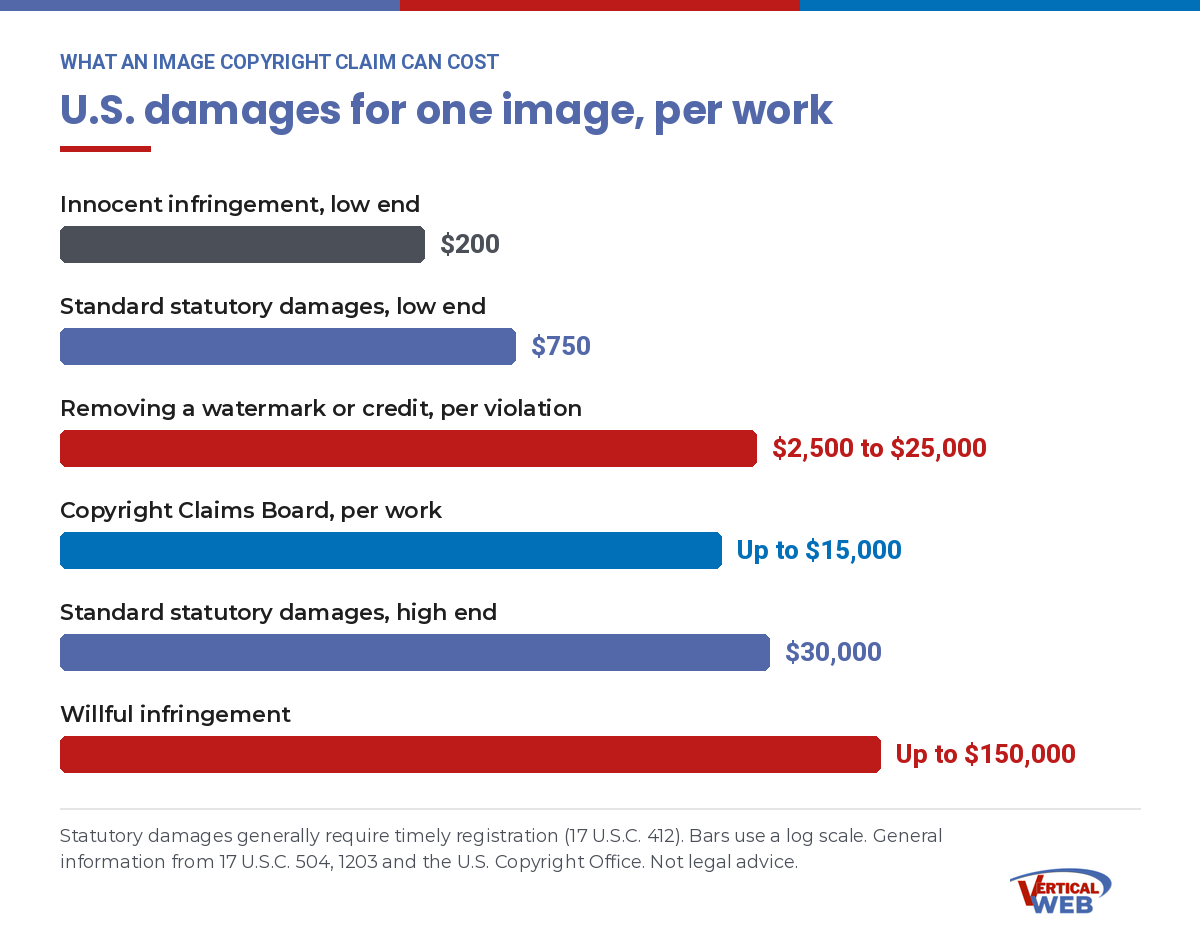
A few details in that table matter more than the headline numbers.
- “Per work” adds up. Five unlicensed photos can mean five separate claims.
- Registration matters. Under 17 U.S.C. 412, statutory damages and attorney’s fees are generally only available if the image was registered before the infringement began, or within 3 months of first publication. That is why large libraries register their collections. It is also something an attorney will check when you get a demand.
- Cropping out a watermark is its own violation. Removing a credit line, watermark or embedded copyright data can trigger the separate $2,500 to $25,000 penalty, on top of the infringement claim.
- Old images still count. The general deadline to sue is 3 years, but many courts start that clock when the owner discovers the use. An image that has sat on a forgotten page for years can still produce a claim.
- Small claims is not small to you. The Copyright Claims Board makes it less expensive for a photographer to file. You can opt out of a CCB case, but you have to follow the instructions in the notice to do it, and opting out can lead the owner to file in federal court instead.
The new AI rules that took effect in 2026
Copyright is not the only legal pressure on images now. Two sets of AI transparency rules started applying on August 2, 2026.
EU AI Act, Article 50
Requires AI-generated content to be marked as machine-detectable, and requires anyone publishing deepfake images to disclose they were AI-made. Fines reach 15 million euros or 3% of worldwide turnover. It matters if you sell to customers in the EU.
California AI Transparency Act
Applies to large AI providers with more than 1 million monthly users. They must embed hidden disclosures in AI images and offer a free detection tool. Penalty: $5,000 per violation, per day.
Most Houston small businesses are not the target of either law. The practical effect is still real. More AI images now carry hidden labels that say where they came from, more platforms can detect them, and tool makers forbid you from stripping those labels out. Canva’s own AI terms, covered below, say exactly that.
Not sure what is sitting on your website right now?
Old pages, old blog posts and images from a previous designer are where most claims start. Our in-house team can review your site and tell you which images have a license trail and which do not, before someone else finds them.
Does a Canva subscription protect you from copyright claims?
Canva is the most popular design tool among small businesses, so this question comes up constantly. The honest answer is: partly, and only if you follow its rules. A Canva subscription is a license with conditions. It is not insurance.
There are two separate sets of Canva terms to understand. One covers the stock photos, graphics and templates in Canva’s library. The other covers images you make with Canva’s AI tools.
Canva's stock library: what the Content License Agreement says
When you use a photo or graphic from Canva’s library, Canva’s Content License Agreement controls what you can do with it. Key points, as published:
- Free content gets a perpetual, non-exclusive, non-transferable worldwide license.
- Pro content is licensed for use in a single Canva design. You are licensed for that design, not for the photo by itself across your whole website.
- No logos or trademarks. You cannot use Canva content as a trademark, logo or business name. A logo built from a Canva stock element is a license violation, and it is also something you cannot register.
- No standalone resale. You cannot sell or display Canva content on its own on ecommerce or print-on-demand product sites. It has to be part of your design.
- Editorial content is restricted. Content marked for editorial use cannot be used commercially, and it requires a credit line.
- Transfers to a client are limited. A designer may transfer a Canva design containing licensed content to a single client, and only with a written agreement that the client will follow Canva’s terms.
Read that last point again if someone else builds your graphics in Canva. If your designer used their Canva account, the license chain runs through them. You want that written transfer, and you want a record of which designs it covers.
Canva's AI tools: what the AI Product Terms say
Canva’s AI features, such as Magic Media and the other Magic Studio tools, fall under Canva’s AI Product Terms. They are clear, and they put the responsibility on you.
- You own your AI output, but only to the extent it is not built from Canva library content, which stays licensed, not owned.
- Canva makes no warranty about the accuracy, completeness or reliability of AI output. It does not promise the output is free of anyone else’s rights.
- You are responsible for making sure your input and output follow the terms and Canva’s Acceptable Use Policy before you use or share it.
- You may not remove the metadata tags that mark content as AI-generated, and you may not mislead people into thinking AI content was made by a person.
- Commercial use is allowed for any lawful purpose, as long as you follow the terms.
So who is liable if Canva generated the image?
Under the terms most small businesses accept, you are. Canva’s AI terms do not include a promise to defend you if an AI image turns out to resemble someone’s protected work.
Canva does offer that kind of protection through a program it calls Canva Shield. According to Canva, eligible Enterprise customers are indemnified for AI output created with Magic Studio products, at no extra cost. That is a meaningful benefit. It is also not what a Canva Free, Pro or Teams subscriber gets. If you are paying for Canva Pro, do not assume Enterprise protection comes with it.
How to use Canva the right way on your website
- Know which account made the design. If it was your designer’s account, get the written transfer Canva requires.
- Keep Pro content inside the design it was licensed for. Do not export a Pro photo and reuse it across other pages as a standalone image.
- Never build a logo from Canva stock elements. Have a human designer create it so you can own and protect it.
- Treat AI output as unverified. Check every AI image for recognizable characters, brand marks, real faces, text and watermarks before it goes live.
- Do not strip AI labels. Leave Canva’s AI metadata in place. Removing it breaks Canva’s terms.
- Save a copy of the terms and your plan details on the date you made the design. Terms change. Your proof should show what applied at the time.
- Check for an editorial flag on any photo of news events, public places or recognizable brands.
How Shutterstock can lower your risk, if it is set up correctly
Shutterstock takes a more traditional approach. You buy a defined license, the license spells out what you can do, and Shutterstock stands behind it with a dollar amount of indemnification. For a business website, that is often a cleaner setup than raw AI output or a free photo site. The protection is only as good as the way it is purchased and recorded, though.
Know which Shutterstock license you have
| License type | Indemnification limit | Best fit |
|---|---|---|
| Standard Image License | $10,000 | Websites, social media and most everyday marketing |
| Enhanced Image License | $250,000 | Larger campaigns, merchandise, templates for resale, higher-risk uses |
| Editorial license | $25,000 | News and commentary only, never to sell a product or service |
Those indemnification figures come from Shutterstock’s published license page. Indemnification means Shutterstock agrees to cover certain claims that arise from using its content as licensed, up to the limit. It does not cover uses that break the license.
The sensitive use rules that catch professional practices
This is the clause we see overlooked the most. Shutterstock’s license restricts how you may portray any person in an image. You may not depict a model:
- in a political context, such as promoting or endorsing a party, candidate, elected official, or political policy or viewpoint;
- as suffering from, or medicating for, a physical or mental ailment;
- in connection with tobacco ads, adult content, dating or escort services; or
- engaging in immoral or criminal activities.
Think about who that touches. A campaign site with a stock photo of smiling “voters.” A medical practice page showing a stock model as a patient with a condition. A criminal defense firm using a stock model in handcuffs. Each of those can break the license even when the license was properly bought. That is why our campaign website design work, our medical website design work and our law firm web design work start with the question of which images are safe to use for that specific purpose.
Shutterstock's AI image generator and its indemnity
Shutterstock also offers AI image generation. Its current license terms handle it differently from most AI tools in two ways. First, you have no right to use an AI output until it is licensed as Shutterstock content. Second, where Shutterstock’s content review is available to a customer, Shutterstock indemnifies against claims arising from AI output only after that review approves the image for commercial use. No approval, no indemnity. The terms also forbid creating output that is false, misleading or fraudulent.
That is a smart model, because a person checks the output before you rely on it. It also means you have to confirm that the review is part of your plan and that the image actually passed it. Do not assume an AI image from any stock site carries the same protection as a licensed photo.
Getty and Shutterstock are still separate companies
You may have heard that Getty Images and Shutterstock were merging. The deal was announced in 2025, but according to Getty’s own SEC filing, the United Kingdom’s competition regulator would only approve it if Shutterstock’s editorial business was sold off. Getty declined and terminated the merger agreement on July 7, 2026. For your website, that means the two libraries still have separate licenses, separate records and separate enforcement. A Shutterstock license does not cover a Getty image, and the reverse is also true.
How Shutterstock licensing should be done for a business website
- Decide who holds the license. Either the license is in your business’s account, or your designer holds it and documents which client and which site it covers. Shutterstock’s terms say it can ask a licensee to disclose the clients a piece of work was delivered to, so that record should exist either way.
- Match the license to the use. Standard for everyday web and social. Enhanced when the image is central to a big campaign or goes on products.
- Never use editorial images to sell. If the image page says editorial use only, it is off limits for your service pages and ads.
- Check the people in the picture against the sensitive use rules, especially for medical, dental, legal and political sites.
- Download the license record for every image and save it with the image ID, the page URL where it is used and the date it went live.
- Keep the original filename or image ID. Renaming a file to “hero-1.jpg” makes it harder to prove where it came from later.
- Do not crop out watermarks or credits. Licensed files do not have watermarks. If yours does, it was never licensed.
Canva, Shutterstock, AI generators and free photo sites, side by side
Here is how the most common image sources compare for a business website. Terms change, so always check the current version for your plan.
| Image source | Can you own the image? | Who stands behind it? | Biggest risk |
|---|---|---|---|
| Raw AI generator output | No, not without real human creative input | Usually no one; most terms put the risk on you | Output that resembles protected work, characters or brands |
| Canva Free, Pro or Teams | Your own AI output, yes; library content is licensed, not owned | No AI indemnity on these plans | Using Pro content outside its single design, logos from stock, stripped AI labels |
| Canva Enterprise | Same as above | Canva Shield indemnity for eligible customers using Magic Studio | Assuming coverage without confirming eligibility |
| Shutterstock Standard license | No, you license it | Up to $10,000 indemnification | Sensitive use violations, license held by someone else |
| Shutterstock Enhanced license | No, you license it | Up to $250,000 indemnification | Paying for less coverage than the use needs |
| Free photo websites | No | Usually no one | Images uploaded by people who did not own them |
| Your own photography | Yes, if you or your employee took it | You | Hiring a photographer without a written rights transfer |
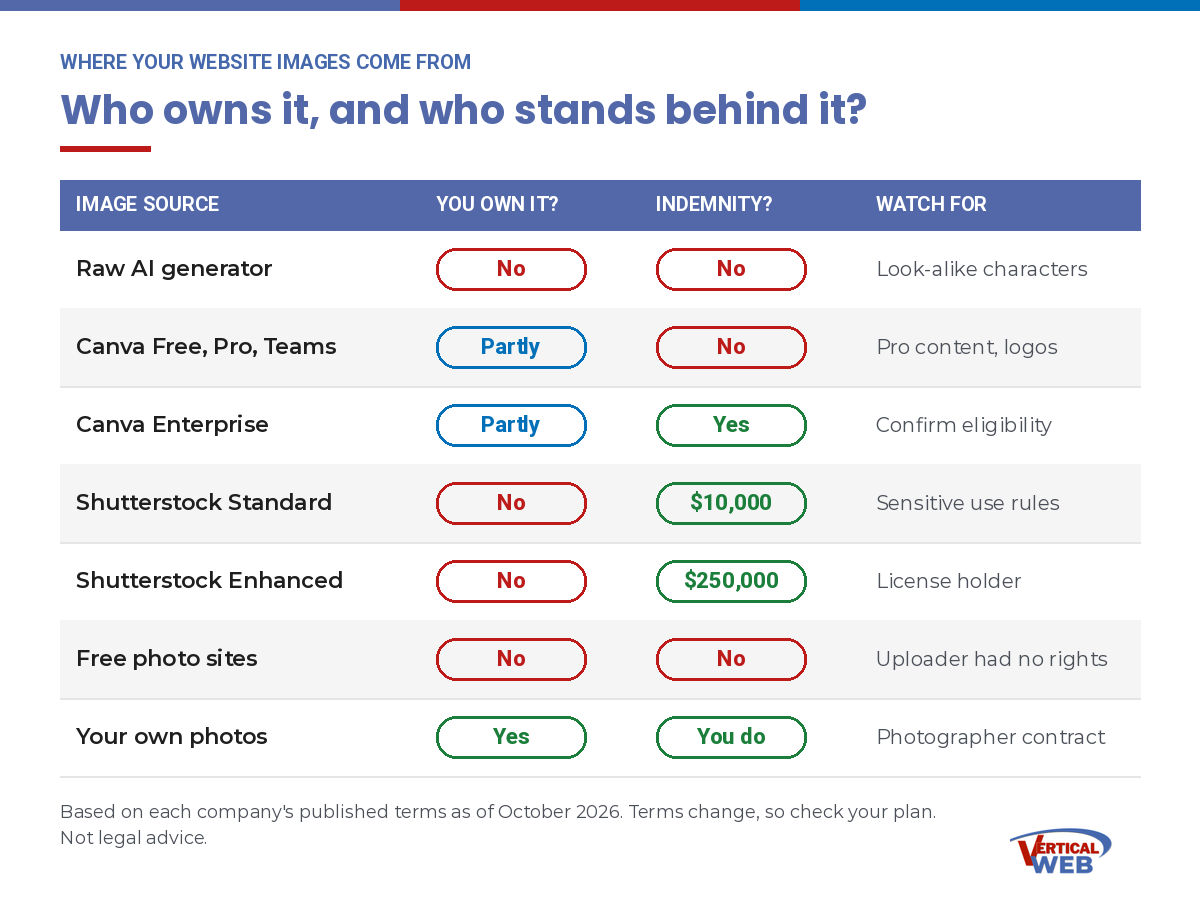
One line in that table deserves extra attention. Hiring a photographer does not automatically give you the copyright. Unless your contract says otherwise, the photographer usually owns the photos and gives you a license. Get the rights you need in writing.
The image license file every business website needs
You cannot control who sends a letter. You can control how fast you can answer one. A simple image license file turns a stressful week into a short email with attachments.
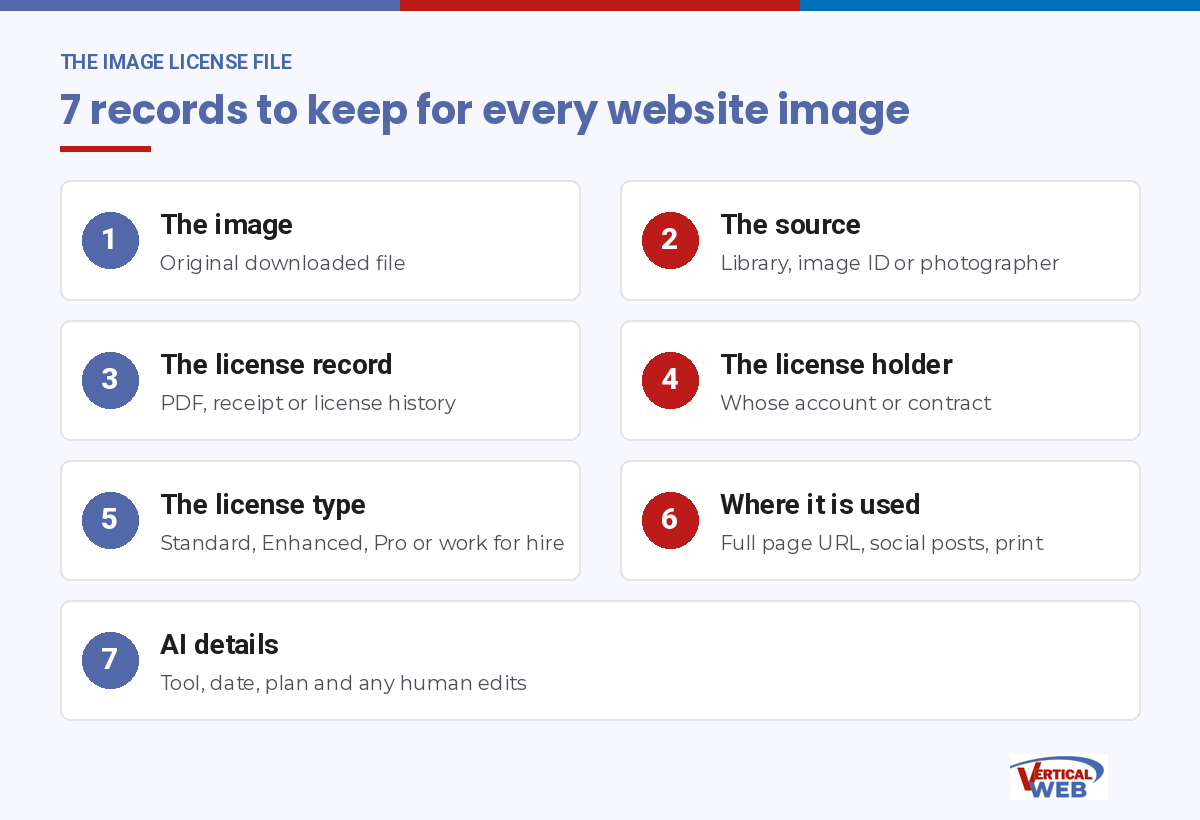
For every image on your site, keep these seven things:
- The image itself, in its original downloaded form.
- The source: the library, the image ID or the photographer.
- The license record: the PDF, receipt or license history download.
- The license holder: whose account or contract it is under.
- The license type, such as Standard, Enhanced, Pro design or work for hire.
- Where it is used: the full page URL, and any social posts or print pieces.
- For AI images: the tool, the date, the plan you were on, and a note on any human edits.
A shared spreadsheet and a folder of PDFs is enough. The point is that it lives with the business, not in one person’s inbox.
Do a cleanup pass on your current site
If you have never done this, start with the pages that matter most and work outward:
- Your home page and main service pages.
- Your blog, especially older posts, since that is where copied images hide.
- Team and about pages, where stock “team” photos sometimes stand in for real staff.
- Testimonials, which should never pair a real review with a stock face.
- PDFs, landing pages and old campaign pages that are still indexed.
Any image you cannot document should be replaced with one you can. Swapping an image does not erase past use, but it stops the clock on new use and removes the target from the next scan. A site-wide image review is a standard part of our website redesign service, because a redesign is the best time to rebuild the license trail from scratch.
What to do if you get a copyright demand letter
Reminder: we are not lawyers and this is not legal advice. These are the practical first steps we would want any business owner to know before calling an attorney.
- Do not panic, and do not ignore it. Note the deadline in the letter.
- Do not delete the image yet without saving a record. Screenshot the page, note the URL and the date, and save a copy. Then remove or replace the image so the use does not continue.
- Check whether the sender is real. Look up the firm or agency yourself rather than clicking links in the message. Scam “copyright notices” with malware links do exist.
- Pull your license file. Find the source, the license record and the license holder for that exact image.
- Call your web designer. If they supplied the image, they should be able to produce the license or tell you plainly that they cannot.
- Talk to a licensed attorney before you pay, sign anything or admit anything in writing. Ask specifically about registration status, the damages actually available, and whether the claim falls under small claims.
- Fix the process, not just the picture. One letter usually means other images on the site have the same problem.
A good web partner is your first call in step 5. A bad one is the reason you are at step 1.
Why the web design company you hire matters more than the image site they use
Every image problem in this article traces back to one moment: when someone put the image on your website. If that someone does not understand licensing, it does not matter whether they shopped on Canva, Shutterstock or an AI tool. The risk lands on you.
Here is how Beth Guide, the principal of Vertical Web, puts it: when you choose a web design company, choose one that knows about these issues, handles the licensing on the images it provides, and can produce that license if anyone ever asks, for as long as you have service with them. That is the standard we hold ourselves to.
Red flags when you are choosing a web designer
"We just pull images from Google"
A search result is not a license. This one answer tells you how the rest of the site was built.
AI images with no review
Quick to make, and nobody checked them for characters, logos, faces or watermarks.
Licenses locked in their account
If the designer will not tell you who holds the licenses, you will not be able to prove them later.
Cropped or blurred watermarks
This is not a shortcut. It is a separate legal violation with its own penalty range.
Questions to ask any web design company before you sign
- Where do your images come from, and who holds the license?
- If I get a copyright letter about an image you supplied, what do you do?
- Will you produce the license documentation if I ask for it?
- Do you use AI image tools? If so, which ones, and who reviews the output?
- How do you handle stock images for medical, legal or political content?
- When the site is finished, what records do I get about the images?
- Do you check older pages and blog posts when you redesign a site?
If a company cannot answer those questions clearly, keep looking. Our guide to hiring a web design company covers the rest of the questions worth asking, from hosting to who owns the site when you leave.
How Vertical Web handles images on the websites we build
We have been building business websites in Houston since 1998, and we still have our original 1998 client. Over that time we have watched image licensing go from an afterthought to a line item that can cost a small business real money. This is how we handle it today.
We handle licensing on the images we provide
When we supply an image for your site, the licensing is our job, and we keep the record.
We produce the license if asked
If a question ever comes up about an image we provided, we produce the license documentation for as long as you have service with us.
A person reviews AI images
When AI tools help with a graphic, a member of our in-house team checks it before it goes on your site.
We know the sensitive use rules
Medical, dental, legal and political sites get images chosen for what the license actually allows.
Why business owners choose us
- We teach this. Beth Guide has taught digital marketing for the SBA, the University of Houston SBDC, Lone Star College and HCC, teaches SEO classes through our Internet Marketing Clinic, and appears as a technology expert on Fox 26. You are hiring the people other marketers learn from.
- One accountable in-house team. Design, development, hosting, content and SEO are all under one roof. When something needs fixing, no vendor points at another vendor.
- Staying power. In business since 1998, Certified Google Partner, a 4.9 Google rating across 38 or more reviews, and First Place triple honors in Best of West Houston 2025.
- Candor. We manage more than $1M a year in PPC, so we know what a lead is worth to you. We will tell you plainly when an image, a tool or a purchase is not worth the risk.
Images are one piece of a website that works. We build WordPress websites that you own, built for search from the first page, and we keep the same care for licensing across your social media graphics too. If you want the full picture of what we do, start with our web design services.
Special notes for law firms, medical and dental practices, campaigns and real estate
Some industries face more image risk than others, either because of advertising rules or because of the sensitive use limits in stock licenses.
Law firms
Avoid stock models shown committing crimes or in custody, and avoid images that imply a real client or result.
Medical and dental
Stock models cannot be shown as suffering from or treating a condition under Shutterstock's terms. Real patient photos need written consent.
Political campaigns
Stock licenses commonly forbid political use of identifiable people. Use your own event photos.
Real estate
Listing photos often belong to the photographer or the listing agent, not to you. Confirm reuse rights.
We cover these issues inside each industry build, including dental website design and real estate website design, where photo rights come up on nearly every project.
One more note on AI. If your goal is to show up in AI search tools, original images and real first-hand content help your pages stand apart. Our AI SEO services focus on making your business the source those tools cite, and generic AI art does not do that.
The bottom line on AI images, stock photos and your website
AI images cannot be copyrighted on their own, but they can still copy someone else’s work. A Canva subscription gives you a license with conditions, not a shield, unless you are an eligible Enterprise customer. Shutterstock can reduce your risk with defined licenses and real indemnification, if the license is in the right hands and matches the use. And image claims are decided on one question: can you prove you had permission?
You do not need to become a copyright expert. You need a web design company that already is careful about this, keeps the records, and will produce them when you ask.
Frequently Asked Questions About AI Images and Copyright
Not when the AI did the creative work. The U.S. Copyright Office and the D.C. Circuit in Thaler v. Perlmutter require human authorship, and the Supreme Court declined to review that case on March 2, 2026. Human edits, original input art, and the creative arrangement of AI elements in a larger work can still be protected.
Yes. An AI image can resemble a copyrighted character, photo or artwork, or include a trademark or a real person’s likeness. The business that publishes the image is responsible for it, and most AI tool terms put that risk on the user.
Canva Pro gives you a license to use its library content under its Content License Agreement, which limits Pro content to a single design and bans using it in logos. Canva’s AI terms make no promise that AI output is free of others’ rights. Canva says its AI indemnification through Canva Shield is for eligible Enterprise customers.
Under Canva’s AI Product Terms, the user is responsible for making sure the input and output comply before using or sharing it. Unless you qualify for Canva Shield as an Enterprise customer, plan on carrying that risk yourself.
Shutterstock lists $10,000 for the Standard Image License, $250,000 for the Enhanced Image License and $25,000 for editorial content. It only covers uses that follow the license terms.
Enforcement is mostly automated and checks against the library’s own license records. Common causes are a license held in a past designer’s name, a missing receipt, an editorial or print-only license, or an image from a free site that the uploader never owned. You need records showing a license that covers your exact use.
For registered works, statutory damages under 17 U.S.C. 504(c) run from $750 to $30,000 per work, up to $150,000 if willful, and can drop to $200 for innocent infringement. Removing a watermark or credit can add $2,500 to $25,000 per violation under 17 U.S.C. 1203. This is general information, not legal advice.
It depends on the company, so ask before you sign. Vertical Web handles licensing on the images we provide and produces the license documentation if you ask, for as long as you have service with us.
Want a website where every image has a paper trail?
Talk with our in-house team at our Galleria office, 713-703-3030, or our Kingwood office, 281-852-8253. We will review your current site, flag the images that have no license trail, and show you what a cleaner setup looks like.
Sources
Every legal and platform fact in this article was checked against these sources in October 2026.
- U.S. Copyright Office, Copyright and Artificial Intelligence reports
- Baker Donelson, Supreme Court denies certiorari in Thaler v. Perlmutter (2026)
- CMS case tracker, Getty Images v Stability AI, UK judgment and appeal
- 17 U.S.C. 504, remedies for infringement, damages
- 17 U.S.C. 1203, civil remedies for copyright management information
- 17 U.S.C. 412, registration as a prerequisite to certain remedies
- Copyright Claims Board, frequently asked questions
- Canva AI Product Terms
- Canva Content License Agreement
- Canva Shield
- Shutterstock License Agreement
- Getty Images Holdings, Form 10-Q for the quarter ended June 30, 2026, merger termination
- Kingsley Napley, The EU AI Act’s transparency rules are now live (August 2026)
- National Law Review, California’s AI regulation deadlines in 2026
Disclaimer. Vertical Web is a web design and digital marketing company. We are not lawyers, and this article is not legal advice. It explains how image licensing works on business websites, based on public court rulings, government guidance and the published terms of the platforms named, as of October 2026. If you have received a copyright demand letter or a lawsuit, talk to a licensed attorney before you respond.
Related Pages
- Web Design Services – Every web design service Vertical Web offers, built in-house on WordPress
- Website Redesign – Rebuild your site without losing rankings, with a full image license review
- WordPress Web Design – Custom WordPress sites you own and can edit
- Logo Design – Human-designed logos you can own and protect
- Law Firm Web Design – Websites for attorneys, built with advertising rules in mind
- Medical Website Design – Practice websites with images chosen for what the license allows
- Dental Website Design – Dental practice websites built for new patient calls
- Political Campaign Website Design – Fast, affordable campaign sites with images you can use
- Real Estate Website Design – IDX real estate websites and listing photo rights
- Guide to Hiring a Web Design Company – The questions to ask before you sign
- AI SEO Services – SEO for AI search, so your business is the source AI tools cite

- Are AI Images Copyrighted? Canva, Shutterstock, Image Claims and Your Website - October 6, 2026
- Can AI Engines See Your Business? - September 17, 2026
- What Every Houston Business Owner Should Learn About SEO - September 15, 2026