

WooCommerce Web Design
WooCommerce Web Design and Development
Custom WooCommerce stores for businesses that want to own their online store: designed, built, hosted and optimized for search in-house by a WordPress team that has built online stores for years.
Galleria 713-703-3030 | Kingwood 281-852-8253
Why WooCommerce
An Online Store You Own, Built on WordPress
WooCommerce turns a WordPress website into a full online store. It is our primary ecommerce platform because it gives businesses something hosted platforms do not: complete ownership. Your products, customer data, content and design live on your site, on hosting you control, with no platform deciding what you can change or how much of each sale it keeps.
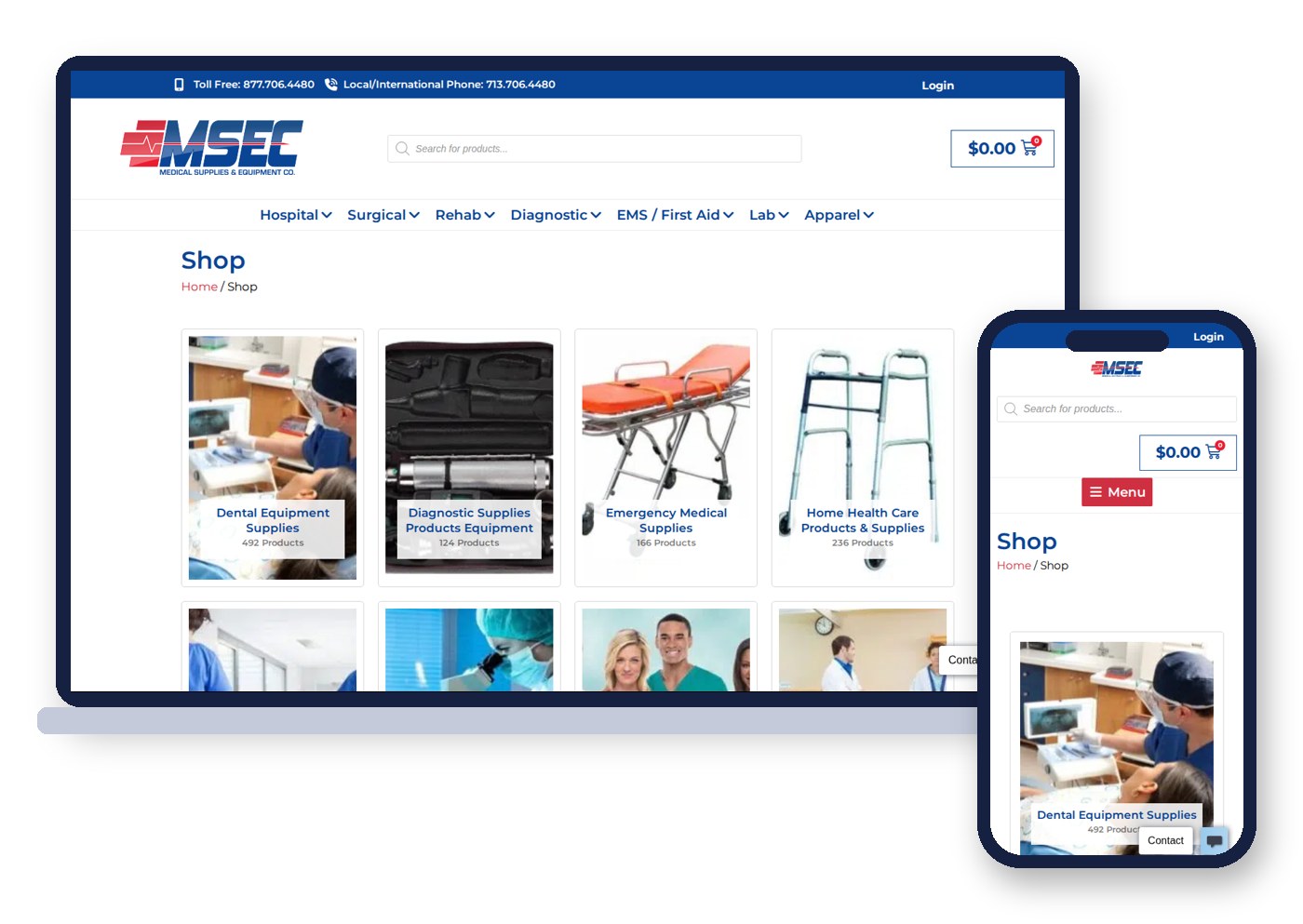
That flexibility matters most for businesses with real complexity: large catalogs, wholesale and retail pricing, product configurators, B2B ordering, quote requests or integrations with inventory and accounting systems. The Medical Supplies and Equipment Company store shown here organizes thousands of medical products into clear categories with live product counts, all on WooCommerce. You can see how it fits our wider approach on our ecommerce web design page.
We design WooCommerce stores the same way we design every website: around the customer, the search terms that bring them in and the action you want them to take. Then our developers build the store, our team hosts it, and our SEO team helps it get found. When a store needs custom features beyond design, our ecommerce web development team takes over.
What We Build
WooCommerce Design Services
Every WooCommerce project is different. These are the services we provide most often.
New WooCommerce stores
Custom store design and build, from catalog structure to checkout, launched on managed hosting.
Migrations to WooCommerce
Moves from Shopify, Wix, Squarespace or older carts with products, customers, orders and URLs preserved.
Store redesigns
A modern design for an existing WooCommerce store without losing rankings or sales history.
Custom features
Product configurators, wholesale pricing, quote requests, subscriptions and custom checkout steps.
Integrations
Payment gateways, shipping, tax, inventory, ERP, CRM and accounting connections.
Speed and optimization
Faster product and category pages, cleaner code and hosting tuned for WooCommerce.
Store Design
What Makes a WooCommerce Store Sell
A store that sells is easy to browse, easy to trust and easy to buy from. These are the design decisions we focus on:
- Category structure: categories and filters planned around how customers shop, so they reach the right product in a few clicks. This structure also drives how category pages rank.
- Product pages: clear photos, honest descriptions, specifications, variations, stock status, shipping details and reviews in a layout that answers buying questions.
- Search: fast product search that handles part numbers, misspellings and synonyms for larger catalogs.
- Cart and checkout: short, secure and familiar, with guest checkout, saved addresses and the payment options your customers expect.
- Mobile shopping: thumb-friendly navigation, filters and checkout, since a large share of shoppers browse on phones.
- Trust signals: security badges, return policies, shipping times, contact details and reviews placed where hesitation happens.
None of these is unique to WooCommerce, but WooCommerce lets us control every one of them. On hosted platforms, many of these details are fixed by the theme or the platform itself.
Shopping Experience
WooCommerce Extensions, Themes and the Shopping Experience
WooCommerce has a huge marketplace of extensions and themes. That is a strength and a trap: every extension adds features, and too many slow the store and create conflicts. We choose carefully and build custom when it is the cleaner answer.
Extensions with a purpose
Each extension earns its place: subscriptions, bookings, product add-ons or wholesale, tested together before launch.
Custom storefront design
Your logo, colors and images applied to a storefront designed for your products, not a generic theme demo.
Product images that sell
Consistent sizes, zoom, galleries and compressed files so product photos look sharp and load fast on any device.
Accessible shopping
Readable text, keyboard-friendly menus and labeled forms so every visitor can browse and buy.
Customer accounts
Order history, saved addresses, reorders and wishlists that bring shoppers back.
Privacy and consent
Cookie consent and privacy settings handled properly for tracking and marketing tools.
The result is a shopping experience that feels simple to the visitor, even when the store behind it is complex. That is the real benefit of WooCommerce done well: the flexibility of open source software with a storefront that feels as smooth as any hosted platform. Businesses comparing WooCommerce with Magento usually find WooCommerce easier to manage day to day, with lower development and hosting overhead for small and mid-sized catalogs.
Common Problems
Why WooCommerce Stores Underperform
Most of the WooCommerce stores we are asked to fix have the same handful of problems. All of them are solvable.
Slow pages
Too many plugins, heavy themes and shared hosting make product pages crawl, especially on phones.
Messy categories
Products scattered across overlapping categories confuse shoppers and search engines alike.
Thin product content
Manufacturer descriptions copied word for word, giving Google no reason to rank the store.
Abandoned checkouts
Long forms, surprise shipping costs and forced account creation drive buyers away.
Plugin conflicts
Years of add-ons that clash after updates, breaking carts or checkout without warning.
Security gaps
Outdated plugins and weak hosting that put customer data at risk.
Many of these problems come down to hosting and maintenance as much as design. A WooCommerce store needs hosting built for ecommerce traffic, regular updates and someone watching for problems. Our ecommerce hosting is managed by the same team that builds the store.
Store Types
WooCommerce Stores for Every Kind of Business
WooCommerce handles far more than a simple product catalog. These are some of the store types we build.
Large catalogs
Thousands of products with filters, search and bulk management, like a medical supply store.
Rentals and bookings
Equipment and event rentals with availability, dates and deposits.
Custom and configurable products
Options, personalization and live price updates as shoppers choose.
Subscriptions
Recurring orders and memberships with automatic billing.
Platform Choices
WooCommerce vs Shopify, Wix and Squarespace
WooCommerce
Full ownership and flexibility, no platform transaction fees, unlimited customization and strong SEO control. Needs good hosting and maintenance.
Shopify
Easy to start and fully hosted, but app fees add up, URL structure is fixed and you rent the platform rather than own it.
Wix and Squarespace
Simple for very small catalogs, but limited for growth, integrations and serious ecommerce SEO.
We are honest about fit, and our WooCommerce vs Shopify comparison lays out where each platform wins. A tiny store that needs to launch this week may be fine on a hosted builder. Once a business depends on online sales, needs integrations or wants to own its data, WooCommerce usually wins. We regularly migrate stores from Shopify, Wix and Squarespace to WooCommerce, keeping product URLs, redirects and order history intact so search rankings survive the move. See our WordPress web design page for why WordPress is our foundation.
Ecommerce SEO
WooCommerce Stores Built to Rank
An online store only sells if shoppers can find it. Ecommerce SEO starts with structure, which is why we plan it before design begins. Category pages are built to rank for broad product searches, product pages for specific ones, and the two link together in a way search engines can follow.
- Clean URLs and categories: a logical hierarchy that matches how people search.
- Unique product and category copy: written to answer questions, not copied from the manufacturer.
- Product schema: price, availability and review markup so listings can show rich results.
- Speed: image optimization, caching and lean code, since slow stores lose rankings and sales.
- Faceted navigation control: filters that help shoppers without creating thousands of duplicate pages.
- Redirects: every old URL mapped during a migration or redesign.
Clear product information also helps AI shopping assistants and AI Overviews understand what you sell. When you are ready to grow traffic beyond launch, our SEO services team can take over, with the advantage of already knowing how your store was built.
Integrations
Systems We Connect to WooCommerce
The right integrations remove manual work and keep orders, inventory and customer data accurate.
Payment gateways
Stripe, PayPal, Authorize.net and other processors, set up securely.
Shipping and fulfillment
Real-time rates, label printing and fulfillment partners.
Tax and accounting
Automated sales tax and accounting sync to cut bookkeeping time.
Inventory and ERP
Stock levels and products synced with the systems your team already uses.
CRM and email
Customers and orders flowing into your CRM and email marketing.
Analytics
Ecommerce tracking for revenue, products, campaigns and abandoned carts.
Why Vertical Web
A WooCommerce Team That Also Hosts and Markets Your Store
In business since 1998
We have been building websites for more than 25 years, and our original 1998 client is still with us.
Every service in-house
Design, development, hosting, SEO and PPC by one accountable team, not a chain of vendors.
Certified Google Partner
A Certified Google Partner managing more than $1M in annual PPC, with a 4.9 Google rating.
Ecommerce problems rarely stay in one lane. A slow checkout is a hosting issue, a design issue and a revenue issue at the same time. Because our team handles all of it, problems get fixed instead of passed around. Stores we build can run on our web hosting, with updates, backups and monitoring handled by the people who know the code.
Maintenance
Keeping a WooCommerce Store Fast and Secure
WooCommerce stores need more care than brochure websites. They process payments, store customer data and depend on plugins that update often. A missed update can break checkout, and a security gap can expose customer information.
Our maintenance plans cover WordPress, WooCommerce and plugin updates tested on a staging copy first, daily backups, uptime and security monitoring, performance checks and quick fixes when something goes wrong. We also review the store regularly for slow pages, failed payments and checkout drop-off, so small problems are caught before they cost sales.
As your store grows, we add what it needs: new product types, wholesale accounts, new payment options or a faster server. The goal is a store that keeps getting better instead of slowly accumulating problems.
Planning Your Store
Budget, Timeline and What to Have Ready
WooCommerce projects vary mostly by catalog size, custom features and integrations. A focused store with a modest catalog moves much faster than a large B2B store with ERP integration. We scope every project in writing so you know what is included and when it will launch.
- Your product list, ideally in a spreadsheet with prices, variations and SKUs.
- Product photos, or a plan for photography.
- Shipping rules, tax requirements and payment preferences.
- Any systems the store must connect to, such as inventory, accounting or CRM.
- Access to your current store if this is a migration.
If your catalog data is messy, that is common. Cleaning product data, organizing categories and writing product copy can all be part of the project.
How We Work
How We Build a WooCommerce Store
1. Discovery
We learn your products, customers, operations and the systems the store must work with.
2. Catalog plan
We plan categories, filters, product templates and URLs for shoppers and search.
3. Design
We design the homepage, category, product, cart and checkout pages, phone view first.
4. Build and test
We build, import products, connect integrations and test every order path.
5. Launch and grow
We launch on managed hosting and keep improving speed, rankings and conversions.
FAQ
WooCommerce Web Design Questions
WooCommerce is the ecommerce platform for WordPress. It turns a WordPress website into a full online store with products, cart, checkout and order management.
It depends on the business. WooCommerce offers more ownership, flexibility and SEO control with no platform transaction fees, while Shopify is simpler to start. For growing stores with custom needs, we usually recommend WooCommerce.
Yes. We migrate products, customers, orders and content, and redirect every old URL so rankings and bookmarks keep working.
Timing depends on catalog size, custom features and integrations. A focused store moves much faster than a large B2B store. We give a schedule in writing before work begins.
Yes. We host stores on servers our own team manages, tuned for WooCommerce, with updates, backups and monitoring included in our plans.
Yes, with the right hosting and setup. We build stores with thousands of products, using careful category structure, fast search and optimized hosting.
We build ecommerce SEO into the store from the start: category structure, unique product copy, product schema, speed and redirects. Ongoing SEO is available to grow traffic after launch.
Yes. We redesign stores without losing sales history or rankings, mapping every URL and testing checkout before launch.
Let's Build a WooCommerce Store That Sells
Tell us about your products, your customers and what your current store does or does not do. We will show you what a WooCommerce store built for speed, search and sales would look like.
Galleria 713-703-3030 | Kingwood 281-852-8253 | info@verticalweb.com
Keep Exploring
Related Pages
No related posts.