

Responsive vs Adaptive Design
Responsive vs Adaptive Web Design: What Still Matters Today
The responsive versus adaptive debate is largely settled. Here is what each approach means, why responsive design won, where adaptive techniques still help, and what actually decides whether your site works on phones and ranks in Google today.
Galleria 713-703-3030 | Kingwood 281-852-8253
The Short Answer
Responsive Design Won, but the Question Changed
A decade ago, businesses had a real choice to make. Adaptive design meant building several fixed layouts and serving the one that matched the visitor’s device. Responsive design meant one flexible layout that reflows to fit any screen. Both solved the same problem: websites built for desktops were painful to use on phones.
Today, responsive design is the standard. Modern CSS, flexible layouts and fluid images make it the simplest way to serve every screen from one site and one URL, and it is what Google recommends. Adaptive design still exists, but mostly as a set of techniques used inside responsive sites rather than a separate approach.
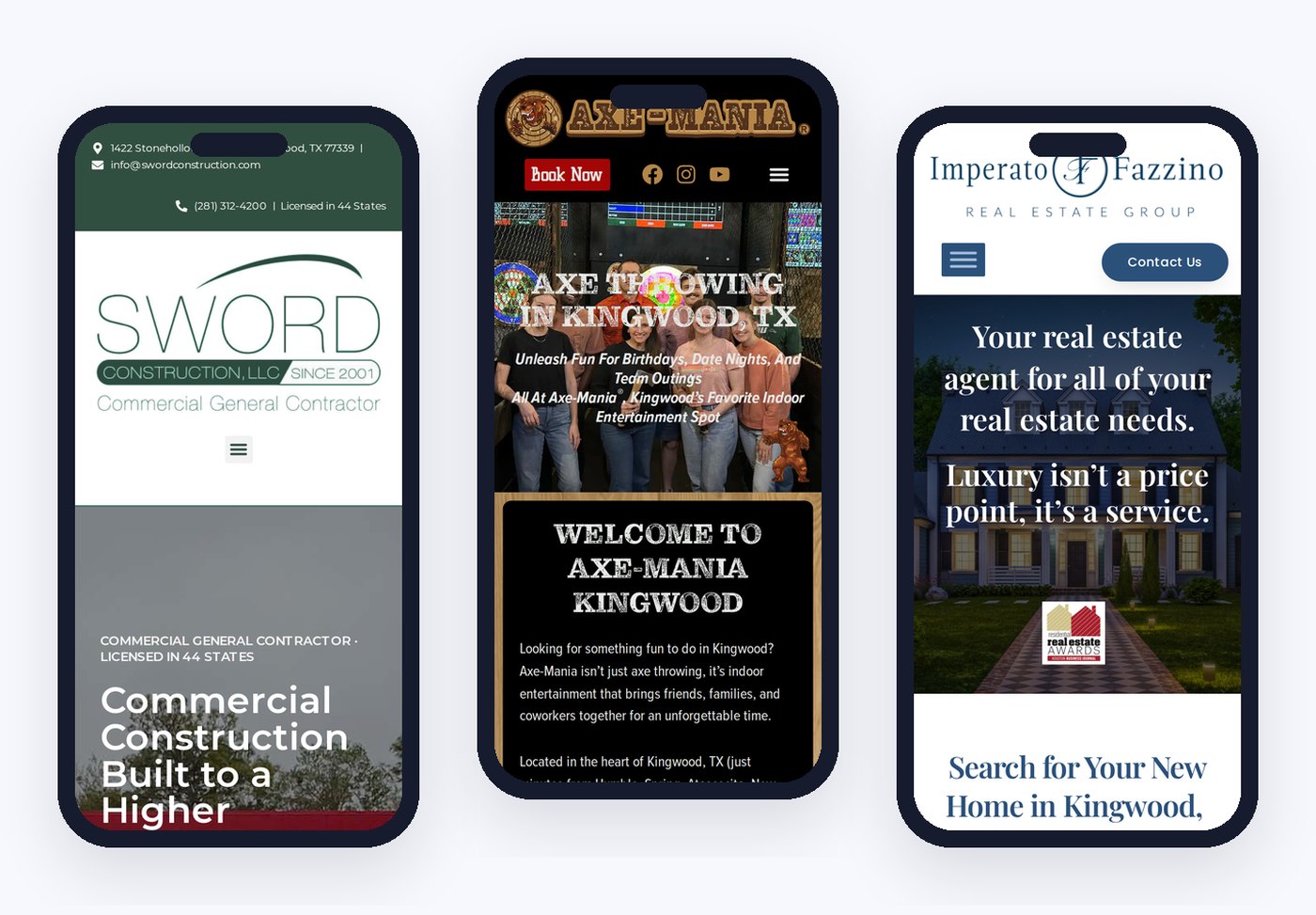
So the useful question is no longer “responsive or adaptive?” It is “how well does my site work on a phone?” That is what decides conversions and rankings now. The image here shows one of our pages reflowing from desktop to tablet to phone. Every site we build through our web design services is designed this way, phone view first.

Definitions
Responsive vs Adaptive Design, Side by Side
Here is how the two approaches compare on the points that matter.
Responsive: one fluid layout
One set of HTML and CSS that stretches, stacks and resizes to fit any screen width.
Adaptive: several fixed layouts
Separate layouts for set screen sizes, with the server or browser choosing which one to show.
Responsive: one URL
The same page and address for every device, which keeps SEO simple.
Adaptive: tailored per device
Can deliver very different experiences per device, at the cost of more design and maintenance.
Responsive: easier to maintain
One layout to update, test and keep consistent.
Adaptive: targeted performance
Can send lighter assets to small devices, a benefit modern responsive techniques now match.
How Each Works
How Responsive and Adaptive Design Work Under the Hood
Responsive design is built on three ideas. Fluid grids size layout columns in percentages or flexible units instead of fixed pixels. Flexible images and media scale within their containers. And CSS media queries apply different styles at breakpoints, the screen widths where the layout needs to change, such as stacking three columns into one on smartphones. Modern responsive design adds container queries, which let a component respond to the space it sits in rather than the whole screen, and fluid typography that scales smoothly between sizes.
Adaptive design starts from the other direction. Designers create a set of fixed layouts for specific resolutions, commonly a phone, a tablet and a desktop width. The site detects the device or screen size, through the browser or on the server, and delivers the matching layout. Each layout can be tuned precisely for its device, but anything between those sizes gets whichever layout is closest.
For designers and developers, the practical difference is control versus flexibility. Adaptive gives tight control at a few chosen sizes. Responsive gives a good result at every size, including devices that did not exist when the site was built. With so many screen resolutions in use today, from small phones to foldables and ultra-wide monitors, flexibility usually wins.
What Changed
Why the Debate Is Mostly Over
Several changes since the early days of mobile web design settled the question in favor of responsive design:
- Mobile-first indexing: Google now uses the mobile version of a page to decide how it ranks. A site that only works well on desktop is effectively ranked on its weakest version.
- Too many screen sizes: phones, foldables, tablets, laptops and large monitors come in countless widths. Fixed adaptive layouts cannot keep up; fluid layouts handle them all.
- Better CSS: flexbox, grid, fluid typography and container queries let a single layout respond precisely to the space available.
- Responsive images: browsers can now choose the right image size for each screen, removing adaptive design’s old speed advantage.
- Separate mobile sites faded: m-dot sites and stripped-down mobile versions created duplicate content and maintenance headaches, and most businesses abandoned them.
The result is that “responsive” is now simply what good web design means. The differences between well-built and poorly built responsive sites matter far more than the old label.
Where Adaptive Still Helps
Adaptive Techniques That Still Have a Place
Adaptive ideas did not disappear. They became tools used within responsive sites.
Serving different images
Smaller, cropped images for phones and larger ones for desktops through responsive image techniques.
Different navigation patterns
A full menu on desktop and a compact menu on phones, chosen by screen size.
Lighter media on mobile
Background video on desktop replaced by a still image on phones to save data.
Touch versus mouse
Larger tap targets and hover alternatives for touch screens.
Dynamic serving for large platforms
Very large sites sometimes serve different HTML by device, which takes careful technical setup.
Accessibility preferences
Respecting settings like reduced motion or larger text sizes.
For most businesses, these techniques should live inside one responsive site with one URL per page. Full dynamic serving is a specialized choice for very large platforms with engineering teams to maintain it, and it requires care so search engines see the right content.
Pros and Cons
Advantages and Limitations of Each Approach
Both approaches have real advantages. Here is an honest summary for mobile users, your team and your search rankings.
Responsive advantages
One codebase, one URL, works on any screen, easier SEO and simpler maintenance.
Responsive limitations
Needs careful planning so heavy desktop content does not slow down phones.
Adaptive advantages
Highly tailored user experience for each target device and tight control over what loads.
Adaptive limitations
More layouts to design and maintain, gaps between breakpoints and more room for SEO mistakes.
Best for most businesses
Responsive design with a few adaptive techniques built in.
When adaptive fits
Very large platforms with engineering teams and very different needs per device.
For most projects, starting from scratch with a responsive, mobile-first structure gives the best balance of user experience, flexibility and cost. The goal is the same either way: smartphone visitors should find what they need, understand it quickly and act without friction, because their behavior decides whether the site earns its keep.
What Matters Now
What Actually Decides Whether Your Site Works on Phones
Calling a site responsive is not enough. These are the things that separate a phone-friendly site from one that only technically fits the screen.
Speed on mobile networks
Fast loading on real phone connections, measured by Core Web Vitals.
Thumb-friendly design
Buttons, menus and forms that are easy to tap with one hand.
Readable text
Comfortable font sizes and line lengths without zooming.
Actions within reach
Click-to-call, booking and quote buttons visible without hunting.
No sideways scrolling
Tables, images and wide content that fit or scroll inside their own space.
Content parity
The same important content on phones as on desktop, so nothing is hidden from Google.
Mobile-First Design
How We Design Mobile-First Websites
We design every site starting with the phone view, then expand the layout for tablets and desktops. Designing small first forces clear priorities: the headline, the proof and the main action have to fit on the first screen, and everything else earns its place below. That discipline usually improves the desktop design too.
Before launch, we test every page on real phone, tablet and desktop sizes, checking for sideways scrolling, tap targets, readable text, image sizes and load speed. After launch, we watch mobile performance and Core Web Vitals over time, because new content and plugins can slowly slow a site down.
If your current site was built before mobile-first indexing and struggles on phones, a website redesign is often the fastest path, and our process keeps the rankings you already have. Our mobile-first web design page covers the service in more detail.
SEO Impact
How Mobile Design Affects SEO and AI Search
Mobile-first indexing
Google ranks pages based on their mobile version, so mobile content and speed directly affect rankings.
Page experience
Core Web Vitals and usability on phones contribute to how pages perform in search.
AI answers
AI tools read the same content Google crawls. Clear, complete mobile pages give them more to quote.
One responsive site with one URL per page keeps SEO straightforward: no duplicate mobile versions, no split link equity and no confusion about which page should rank. Our SEO services build on that clean foundation.
Why Vertical Web
A Team That Designs for Phones First
Phone view first
Every layout starts small and grows, so mobile visitors get the best version.
Tested on every size
Desktop, tablet and phone checks before every launch, including sideways scroll and tap targets.
Building websites since 1998
We have designed through every era of the web, from desktop-only to mobile-first.
We have watched the web move from desktop monitors to phones in people’s pockets, and our design process changed with it. If you are not sure how your site performs on phones, a free website audit will show you, alongside speed and search visibility. Small businesses can also see our small business web design approach.
FAQ
Responsive vs Adaptive Design Questions
Responsive design uses one flexible layout that reflows to fit any screen. Adaptive design uses several fixed layouts and serves the one that matches the device.
For almost every business website, responsive design is the better choice today. It is easier to maintain, keeps one URL per page and is what Google recommends.
Yes, mostly as techniques inside responsive sites, such as serving different image sizes or navigation by screen size. Full adaptive or dynamic serving is mainly used by very large platforms.
Yes. Google uses the mobile version of pages for ranking, and a single responsive site avoids duplicate mobile versions and split links.
Not necessarily. A site can fit the screen and still be slow, hard to tap or hide content. Speed, readability and easy actions matter as much as layout.
No. Separate mobile sites create duplicate content and extra maintenance. One responsive site is the modern standard.
Let's Make Your Site Work Beautifully on Every Screen
Tell us about your website and your customers. We will show you how your current site performs on phones and what a mobile-first redesign would change.
Galleria 713-703-3030 | Kingwood 281-852-8253 | info@verticalweb.com
Keep Exploring
Related Pages
No related posts.

