
ECOMMERCE PLATFORMS, EXPLAINED PLAINLY
WooCommerce vs Shopify: Which Is Right for Your Store?
An honest comparison from a team that builds online stores every week: what each platform costs, who owns what, how each handles SEO and growth and when Shopify is actually the better choice.
Galleria 713-703-3030 | Kingwood 281-852-8253
THE SHORT ANSWER
Own your store or rent one
The biggest difference between WooCommerce and Shopify is ownership. WooCommerce is free, open source software that turns a WordPress website into a store. You own the store, the code, the data and the content, and you choose where it is hosted.
Shopify is a hosted platform you subscribe to. It handles hosting and security for you. In exchange, you work within its rules, its themes, its app store and its fees.
Both can run a successful store. Shopify is usually faster for one person to launch alone. WooCommerce usually wins when a business wants full control, lower long term platform costs, stronger content and SEO or features that do not fit a hosted platform.
We should be upfront: we build WooCommerce stores, and our WooCommerce web design service is built around it. When Shopify fits a business better, we say so.
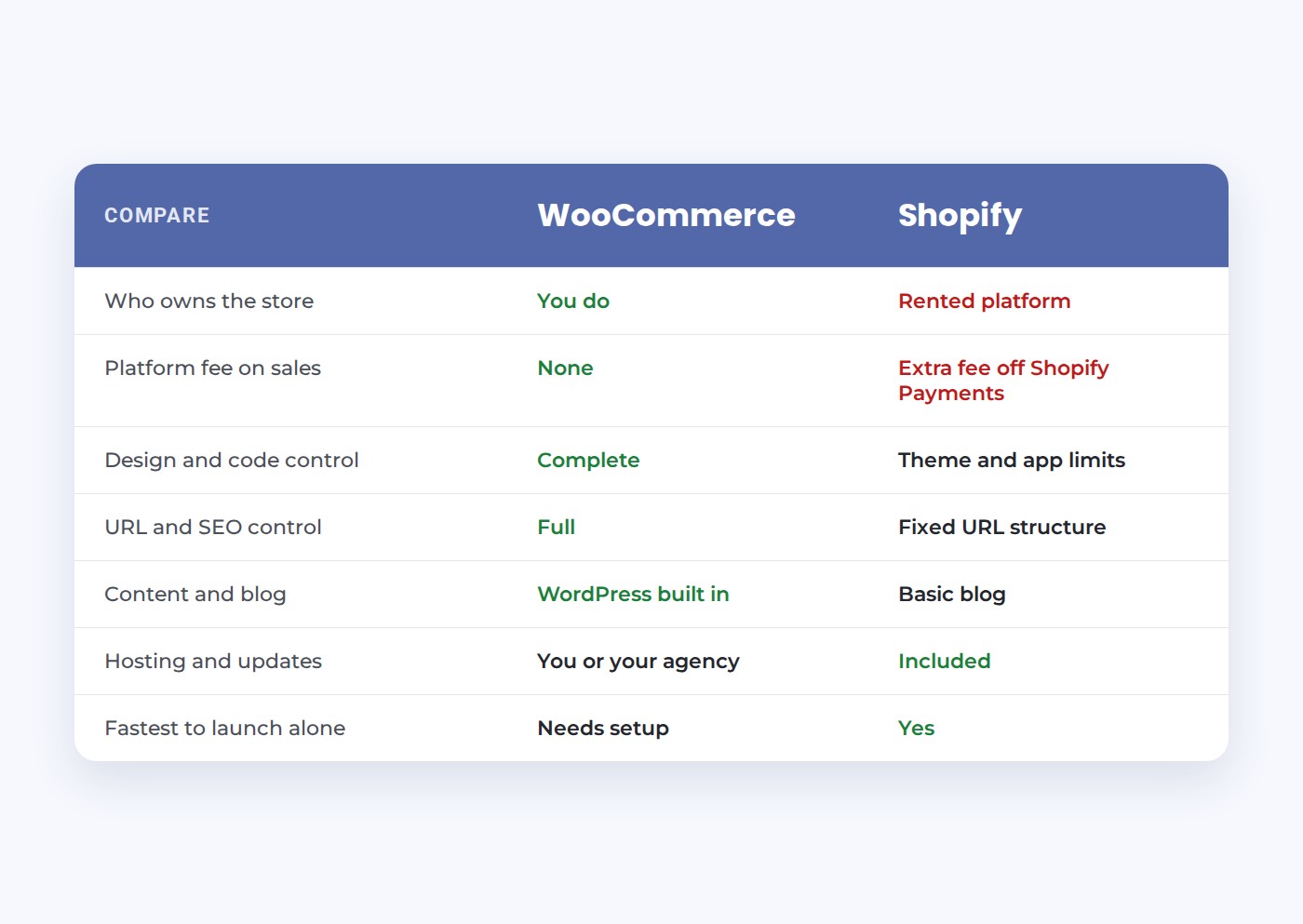
SIDE BY SIDE
WooCommerce vs Shopify on what matters most
Ownership
WooCommerce: you own the store and can move hosts anytime. Shopify: you rent the platform and follow its terms.
Fees on sales
WooCommerce adds no platform fee. Shopify adds 0.2% to 2% when you use a payment provider other than Shopify Payments.
Design control
WooCommerce: any design you can imagine. Shopify: polished themes, with deeper changes limited by the platform.
SEO control
WooCommerce: full control of URLs, structure and content. Shopify: solid basics with a fixed URL structure.
Hosting
WooCommerce: you or your agency choose and manage hosting. Shopify: hosting is included and managed for you.
Extensions and apps
Both have large marketplaces. WooCommerce extensions are usually one time or yearly. Shopify apps usually bill monthly.
SEO
Which is better for SEO, WooCommerce or Shopify?
For stores that depend on organic search, WooCommerce usually has the edge, and Beth Guide does not soften her view on this. She has told class attendees asking for Shopify help that the first thing she would do is move off Shopify, because you end up with your back against the wall fighting the platform itself.
The technical reasons are straightforward:
- URL structure. Shopify forces folders such as /products/ and /collections/ into every address. WooCommerce lets you choose clean structures.
- Content. On WooCommerce, the store and a full WordPress blog live on one site, so buying guides and articles can link straight into categories and products.
- Control. Headings, schema, internal links, canonical tags and page speed can all be tuned directly.
She also tells a cautionary story. A store we built was doing very well. The owner moved it to Shopify to get a feature the old store lacked. About three years later he called back: the traffic was gone, even though the move had been handled by someone who knew what he was doing. Platform limits add up over time. Read why web design and SEO go hand in hand for more on why structure matters.
FLEXIBILITY
Which platform fits how your business actually sells?
Every business sells a little differently. A distributor quotes custom pricing to each dealer. A rental company needs dates, deposits and availability. A manufacturer sells some products online and routes others to a sales rep. A medical supplier shows some products only to approved accounts. These are not edge cases. They are how real businesses work.
On a hosted platform, the question is always “what does the platform allow, and which app can approximate it?” The business bends its process to fit the software, and when an app does not exist, the answer is a workaround: a manual step, a spreadsheet or not offering what customers ask for.
WooCommerce flips the question to “how does your business work, and how should the store support it?” Because you own the code, a developer can shape checkout, pricing rules, account types, product data and shipping logic directly. Our ecommerce web development team does exactly that.
THE CASE FOR VERTICAL WEB ON ECOMMERCE PLATFORMS
Advice from people who will tell you when Shopify wins
We teach this
Beth Guide teaches ecommerce and SEO for the SBA, the University of Houston SBDC, Lone Star College and HCC.
Candor
If your store is small, standard and you have nobody to manage it, we will tell you Shopify may be the better fit.
Hosting solved
The biggest WooCommerce downside is hosting and upkeep. We handle both in-house, so you get control without the chores.
WHEN SHOPIFY WINS
When is Shopify the better choice?
Shopify is a good product, and for some businesses it is the right call:
- A small catalog of standard products with simple shipping.
- One owner launching alone, with no budget for hosting, development or support.
- No need for custom pricing, quotes, account types or deep integrations.
- Most sales coming from social media, marketplaces or in person, so organic search matters less.
In those cases, Shopify’s simplicity is worth its limits. Just go in with eyes open about monthly app costs, transaction fees on outside payment providers and the URL structure you will live with.
The flip side is that WooCommerce’s main weakness is upkeep. It needs good hosting, regular updates and security monitoring. That is why we host and support the stores we build on our own WordPress hosting, so owners get the control without becoming system administrators.
SWITCHING
How do you move from Shopify to WooCommerce?
Moving platforms is common and very doable when it is planned:
1. Export everything. Products, variants, collections, customers and order history, where Shopify allows.
2. Map every URL. Each /products/ and /collections/ address gets a 301 redirect to its new WooCommerce home so links and rankings carry over.
3. Improve as you move. Rewrite thin category pages, replace duplicate manufacturer descriptions and fix image sizes.
4. Test real orders. Every payment, shipping and tax scenario, before launch.
5. Watch Search Console. For the first weeks, check indexing and fix any missed redirects quickly.
For a broader look at platforms, see our older comparison of WordPress vs Shopify and our main ecommerce web design page.
Setup and day-to-day use
Ease of use: which ecommerce platform is easier to set up and run?
Shopify is easier to start. You pick a Shopify plan, choose a theme, add products and connect payments, all inside one dashboard. Hosting, SSL and security updates are handled for you. For a user who has never built a website, that ease is the main reason to choose it.
WooCommerce takes more setup. You need WordPress, a hosting provider, a domain, an SSL certificate, a theme and the WooCommerce plugin, then the extensions for shipping, tax and payments. Once it is set up, day-to-day work feels similar: adding products, updating inventory and filling orders all happen in a browser. The difference is who handles the technical side.
That is where the experience gap closes. When we build a WooCommerce store, we do the setup, host it and keep it updated, so the owner gets the control of WooCommerce with roughly the ease of a hosted platform. If you plan to run a store with no technical help at all, Shopify is the simpler option. If you have a partner handling the site, WooCommerce gives you far more room to grow. Our WooCommerce web design service covers that whole setup.
Plugins, apps and payment gateways
Features and customization: plugins, apps, themes and payment gateways compared
Both platforms extend through add-ons. Shopify has its app store. WooCommerce has thousands of plugins and extensions, plus the entire WordPress plugin library. The practical difference is cost and control. Shopify apps usually bill monthly, and a busy store can stack up many of them. WooCommerce extensions are usually a one time or yearly license, and anything missing can be built.
Payment gateways show the gap clearly. Shopify pushes you toward Shopify Payments and adds a fee when you use another provider. WooCommerce works with many payment gateway options, including Stripe, PayPal and Square, with no platform fee on top. You pay the processing fee your provider charges, and that is all.
Customization goes further on WooCommerce because you own the code. Custom pricing for dealers, quote requests, product configurators, member pricing, subscriptions and deep integrations with inventory or accounting tools are all possible. On Shopify, many of those depend on whether an app exists and what the theme allows. If your store needs a feature no platform ships with, our ecommerce web development team builds it.
Price over time
WooCommerce vs Shopify pricing: what each online store costs and who takes a cut of each sale
Shopify pricing is a monthly plan plus payment processing on every sale, plus an extra 0.2% to 2% when you use a payment provider other than Shopify Payments, plus any monthly apps. So on a single sale, Shopify takes the processing fee, and possibly the outside provider fee, before you see the money. The plan cost is easy to see. The app and fee costs grow as the store grows.
WooCommerce itself is free and does not take a percentage of sales. Your costs are hosting, your domain, any paid extensions and the processing fee from your payment gateway. The trade-off is that you need good hosting and someone to maintain the store. Bargain hosting is a false saving for a store, because a slow checkout loses sales.
For a small catalog, the totals can be close. As sales grow, WooCommerce usually costs less per sale, because there is no platform cut and fewer monthly app charges. Stores that take cards also need the right setup, which we explain in what PCI compliant web hosting is.
Speed and growth
Performance and scalability: which ecommerce store grows better?
Shopify handles performance for you on its own infrastructure, and it scales well for standard stores. You do not control the server, but you do not have to manage it either. Theme choice and the number of apps you install have the biggest effect on speed.
WooCommerce performance depends on the hosting provider. On weak shared hosting, a busy WooCommerce store will slow down at checkout. On hosting built for ecommerce, with object caching and enough resources, it scales to large catalogs and heavy traffic. We run our own ecommerce tier for that reason, and our team tunes each store for Core Web Vitals.
The bigger scalability question is often the business, not the server. When a store adds wholesale accounts, multiple warehouses or custom shipping logic, WooCommerce can grow with it. Shopify can too, but often through higher plans and more apps. For a deeper look at the wider platform choice, read WordPress vs Shopify.
Dropshipping, international and marketing
Which platform is better for dropshipping, international selling and ecommerce marketing?
For dropshipping, Shopify is often the quicker start, because supplier apps connect in a few clicks. WooCommerce supports dropshipping through plugins too, with more control over pricing rules and product data. If dropshipping is your whole business model and speed to launch matters most, Shopify is a reasonable option.
For international selling with multiple currencies, both platforms can do it. Shopify builds some of it into its plans. WooCommerce uses extensions for currency, tax and translated content, which gives you more control at the cost of more setup.
For marketing, WooCommerce has a clear edge when organic search matters. Because the store and a full WordPress blog live on one site, content marketing, buying guides and email marketing can link straight into products and categories. That is how a store earns traffic it does not have to pay for. Our content marketing team writes that content for the stores we build.
QUESTIONS
WooCommerce vs Shopify questions
WooCommerce. Because it is open source and runs on WordPress, a developer can change checkout steps, pricing rules, account types, product data and integrations directly. Shopify is customizable within its themes and app store, but deeper changes are limited by the platform.
WooCommerce gives more control over URLs, site structure, content and schema, and it puts your store and your blog on one WordPress site. Shopify covers the basics well but uses a fixed URL structure. For stores that depend on organic search and content, WooCommerce usually has the edge.
For one person launching a simple store alone, usually yes. Shopify handles hosting, security and updates for you. WooCommerce needs good hosting and someone to manage updates, which is why many businesses pair it with a team that hosts and supports it.
WooCommerce itself is free and adds no platform fee on sales. You pay for hosting, any premium extensions and development. Shopify charges a monthly plan, adds a transaction fee of 0.2% to 2% when you use a payment provider other than Shopify Payments and many apps bill monthly.
Yes. Products, customers and order history can usually be exported and imported. The critical step is mapping every Shopify URL, which uses forced folders such as /products/ and /collections/, to its new address with 301 redirects so rankings carry over.
When you have a small, standard catalog, no budget for hosting and support, nobody to manage updates and no need for custom pricing or integrations. In that situation, Shopify’s simplicity is worth its limits.
Shopify charges payment processing on every sale, adds 0.2% to 2% when you use a provider other than Shopify Payments, and charges a monthly plan fee plus any app fees. The exact amount depends on your plan and payment provider.
No. WooCommerce is free and adds no platform fee. You pay your payment gateway’s processing fee, hosting, your domain and any paid extensions.
Shopify is often faster to start because supplier apps connect easily. WooCommerce can dropship through plugins and gives you more control over pricing and product data.
Both can sell internationally. Shopify builds some currency features into its plans, while WooCommerce uses extensions that take more setup but give you more control.
WooCommerce takes more setup, since you need hosting, a theme and plugins. Day-to-day work is similar. When an agency sets it up and hosts it, most owners find it just as easy to run.
Not sure which platform fits your store?
Request a free website audit. We will look at your products, how you sell and where your traffic comes from, then tell you plainly which platform makes sense.
Galleria 713-703-3030 | Kingwood 281-852-8253 | info@verticalweb.com
No related posts.