


WooCommerce vs Shopify
WooCommerce vs Shopify: Which Is Right for Your Store?
An honest comparison from a team that builds WooCommerce stores every week. What each platform costs, who owns what, how each handles SEO and growth, and when Shopify is actually the better choice.
Galleria 713-703-3030 | Kingwood 281-852-8253
The Short Answer
Own Your Store or Rent One
The biggest difference between WooCommerce and Shopify is ownership. WooCommerce is free, open source software that turns a WordPress website into an online store. You own the store, the code, the data and the content, and you choose where it is hosted. Shopify is a hosted platform you subscribe to. It handles hosting and security for you, and in exchange you work within its rules, its themes, its app store and its fees.
Both platforms can run a successful store. Shopify is usually faster for one person to launch alone. WooCommerce usually wins when a business wants full control, lower long-term platform costs, stronger content and SEO, or features that do not fit inside a hosted platform. The table here sums up the differences most store owners care about.
We should be upfront: we build WooCommerce stores. It is the platform we recommend most, and our WooCommerce web design service is built around it. That is exactly why we know where it shines and where it does not. When Shopify is the better fit for a business, we say so.
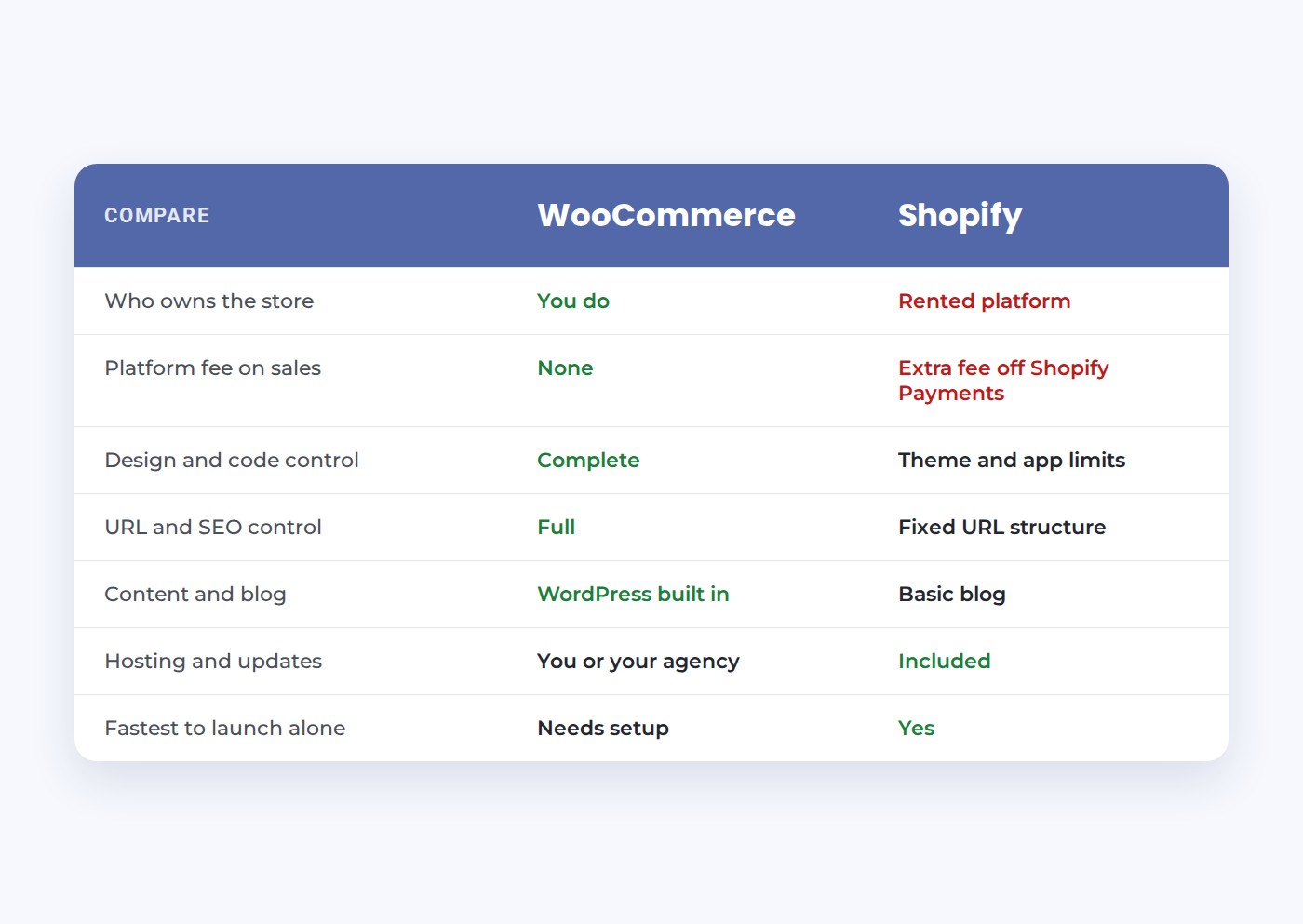
Side by Side
WooCommerce vs Shopify on What Matters Most
Here is how the two platforms compare on the questions store owners ask us most often.
Ownership
WooCommerce: you own the store and can move hosts anytime. Shopify: you rent the platform and follow its terms.
Fees on sales
WooCommerce adds no platform fee on sales. Shopify adds a fee of 0.2% to 2% when you use a payment provider other than Shopify Payments.
Design control
WooCommerce: any design you can imagine. Shopify: polished themes, with deeper changes limited by the platform.
SEO control
WooCommerce: full control of URLs, structure and content. Shopify: solid basics, with a fixed URL structure.
Hosting
WooCommerce: you or your agency choose and manage hosting. Shopify: hosting is included and managed for you.
Extensions and apps
Both have large marketplaces. WooCommerce extensions are usually one-time or yearly; Shopify apps are usually monthly.
Flexibility
A Store Built Around Your Business, Not Around a Platform
Every business sells a little differently. A distributor quotes custom pricing to each dealer. A rental company needs dates, deposits and availability. A manufacturer sells some products online and routes others to a sales rep. A medical supplier has to hide some products from the public and show them only to approved accounts. These are not edge cases. They are how real businesses work.
On a hosted platform, the question is always “what does the platform allow, and which app can approximate it?” The business bends its process to fit the software. When an app does not exist, or works only halfway, the answer is a workaround: a manual step, a spreadsheet, a separate system, or simply not offering what customers ask for.
WooCommerce flips that question to “how does your business work, and how should the store support it?” Because you own the code, a developer can shape checkout steps, pricing rules, account types, product data, shipping logic and integrations around your actual process. That is the real meaning of flexibility. It is not about having more settings. It is about never having to tell a customer “our website cannot do that.”
Customizing to the client’s business is the core of how we build. We start every ecommerce project by learning how you sell today, where orders get stuck, what your staff does by hand and what your best customers ask for. Then we design the store to remove those friction points, using standard WooCommerce features where they fit and custom WordPress development where they do not.
Customization Examples
What Customizing a WooCommerce Store Looks Like
These are the kinds of business-specific changes we build regularly. On most hosted platforms, each one would mean a compromise or another monthly app.
Pricing by customer type
Retail, wholesale and contract pricing shown automatically based on who is logged in.
Restricted catalogs
Products visible only to approved accounts, licensed buyers or specific regions.
Quote instead of cart
High-ticket or configured products that route to a quote request instead of checkout.
Rentals and reservations
Date-based availability, deposits, delivery windows and return tracking.
Product configurators
Options that change the price, the image and the specifications as shoppers choose.
Back-office sync
Orders, stock and customers flowing to the ERP, accounting or CRM your team already uses.
Costs
What WooCommerce and Shopify Really Cost
Comparing costs is where most articles go wrong, because the two platforms charge in different places.
- Shopify charges a monthly subscription that rises with each plan, card processing fees on every sale, and an extra transaction fee when you use a payment provider other than Shopify Payments. That extra fee ranges from about 0.2% on Shopify Plus to 2% on the Basic plan, on top of what the payment provider charges. Most stores also pay monthly fees for apps that add features.
- WooCommerce itself is free. You pay for hosting, a domain, card processing through the payment gateway you choose, and any premium extensions. There is no platform fee on your sales.
For a small store, the totals can be close. As sales grow, the picture usually shifts toward WooCommerce, because Shopify’s percentage-based fees and monthly apps grow with revenue, while WooCommerce hosting costs grow slowly. The biggest variable on both platforms is the build itself: custom design and features cost more than a theme, on either one.
One cost that rarely appears in comparisons is the cost of leaving. Moving a large store off Shopify means rebuilding the design and remapping every URL. Moving a WooCommerce store to a new host is routine, because you own every file.
Total Cost
Total Cost of Ownership by Store Size
Rather than quoting prices that change, here is how the cost picture usually plays out at different sizes:
- Starting out, small catalog, low sales: Shopify’s monthly plan and a few apps are often comparable to WooCommerce hosting and a modest build. The deciding factor is usually ease versus future flexibility.
- Growing store, steady monthly sales: Shopify’s percentage-based fees and app subscriptions grow with revenue, especially if you use your own payment processor. WooCommerce costs stay closer to flat, since hosting grows slowly.
- Established store with integrations: custom features become the main cost on both platforms. On WooCommerce you build and own them; on Shopify you rent apps or move to an enterprise plan.
- Large catalog or B2B: WooCommerce usually costs less over time for complex stores, because the features that drive enterprise platform pricing are built once and owned.
The most reliable way to compare is to list every monthly fee you would pay on each platform at your expected sales volume, including apps and payment fees, then add the build. We are happy to run that comparison for your store.
Ease of Use
Which Platform Is Easier to Manage Day to Day?
Ease of use is Shopify’s strongest argument, and it is a fair one. Shopify’s dashboard is clean, setup is guided, and there is no hosting provider to choose or software to update. A store owner can add products, process orders and change theme settings without technical help.
WooCommerce runs inside the WordPress dashboard. Once the store is set up, adding products, managing orders, issuing refunds and editing pages are just as straightforward, and your team uses one system for the store and the rest of the website. The difference is setup and upkeep: someone has to choose hosting, configure the store, keep WordPress, WooCommerce and plugins updated, and watch security.
For a business working with an agency that handles that layer, the day-to-day experience is close to equal. For a solo founder who wants nothing technical to think about, Shopify is easier. That is the honest tradeoff: Shopify trades flexibility for convenience, and WooCommerce trades a bit of convenience for control.
Payments
Payment Gateways and Payment Methods Compared
How you accept payments affects both cost and customer experience. The two platforms handle it differently.
Stripe
Supported on both. On Shopify, using it instead of Shopify Payments adds Shopify’s third-party fee.
PayPal
Available on both platforms as a payment method alongside cards.
WooPayments
WooCommerce’s own payment option, one of many gateways you can choose from.
Shopify Payments
Shopify’s built-in processor, which avoids its third-party fee where it is available.
Apple Pay and Google Pay
Fast mobile checkout options supported on both platforms through common gateways.
Invoices and purchase orders
Easy to add on WooCommerce for B2B buyers; more limited on standard Shopify plans.
The key point is freedom of choice. WooCommerce lets you pick the payment gateway with the best rates and features for your business, and switch later without penalty. Shopify works best when you use Shopify Payments, and charges extra when you do not. For businesses with existing merchant accounts or negotiated rates, that difference can be significant.
When WooCommerce Wins
Choose WooCommerce If You Need
These are the situations where we recommend WooCommerce without hesitation.
A large or complex catalog
Thousands of products, many variations, custom filters or product data imported from other systems.
B2B or wholesale pricing
Customer-specific prices, quote requests, purchase orders, tax exemptions and account approval.
Content-driven growth
Blogs, buying guides and resources that rank and feed shoppers into product pages.
Custom integrations
ERP, inventory, CRM, accounting or industry software that has to sync with orders.
Payment freedom
Your choice of payment gateway without paying the platform an extra cut.
Full ownership
A store you can move, extend or hand to another developer at any time.
Many of these needs come from businesses that started on a hosted platform and outgrew it. A medical supply store with thousands of products, an equipment rental company with deposits and dates, a distributor with dealer pricing: these are WooCommerce stores. Our ecommerce web development and custom WordPress development teams build the custom pieces.
When Shopify Wins
Shopify Is the Better Choice When
You need to launch alone, fast
A simple store with a small catalog can be live on Shopify in days, with no developer.
You want zero technical upkeep
Shopify handles hosting, security and updates, so there is nothing to maintain.
You sell heavily in person
Shopify POS ties retail counters and online sales together out of the box.
If that describes your business and you do not expect complex needs, Shopify is a reasonable choice and we will tell you so. The tradeoff shows up later: as the store grows, so do the monthly apps, the fees and the limits on what you can change. If you choose WooCommerce with a team that handles hosting and maintenance, most of Shopify’s convenience advantage disappears.
Plugins and Customization
WooCommerce Plugins vs Shopify Apps
Both platforms extend their features through add-ons. How those add-ons work, and what they cost over time, is different.
Plugin ownership
WooCommerce plugins install on your site. Many are free; premium plugins are usually a yearly license.
Monthly app fees
Shopify apps usually bill monthly, and stores commonly run several at once.
Custom code
WooCommerce can be customized at the code level when a plugin does not fit. Shopify limits what can change.
Subscriptions
Both support subscription products through add-ons, with more control over billing logic on WooCommerce.
Storefront design
WooCommerce storefronts can match any brand. Shopify themes are polished but share common layouts.
Developer access
WooCommerce works with any WordPress developer. Shopify work requires developers familiar with its theme language.
SEO
Why Platform Websites Often Struggle to Rank
We are often asked why a store on Shopify, Wix or Squarespace that looks great still does not show up on Google. The platforms are not invisible to search engines, and stores on every platform do rank. But hosted platforms share a few structural limits that make it harder to compete for valuable searches:
- Fixed URL structures: platform-imposed folders in product and collection URLs, and limited control over how categories nest, make it harder to build a clean, logical site structure.
- Thin, template-driven pages: themes are built to look good with very little content. Category pages often have a title, a grid and nothing else, which gives search engines and AI tools little to understand or quote.
- Duplicate content from filters and tags: automatically generated tag and filter pages can create many near-identical URLs that compete with each other.
- Limited technical control: restricted access to structured data, redirects, indexing rules, page speed settings and server configuration.
- App-heavy pages: every app adds scripts, and stacks of apps slow pages down, especially on phones.
- Weak content tools: basic blogs and limited page layouts make it hard to publish the guides, comparisons and resources that earn rankings and links.
Website builders built for everyone are, by design, not built for competing hard in search. They make the common case easy and the advanced case difficult. Ranking for competitive terms usually requires the advanced case: precise structure, rich category content, careful technical control and steady publishing.
WordPress and WooCommerce remove those limits. You control every URL, every heading, every redirect and every piece of structured data, and WordPress is one of the strongest content platforms available. Control alone does not create rankings, but it removes the ceiling. Paired with our SEO services and AI SEO services, it gives your store room to compete.
SEO and AI Search
WooCommerce vs Shopify for SEO
Both platforms can rank. The difference is how much control you have when you need to compete hard for product and category searches. Our SEO services team works on both, and the gap shows most in large catalogs.
URL structure
WooCommerce lets you design clean category and product URLs. Shopify adds fixed folders to product and collection URLs.
Site structure
WooCommerce category hierarchies are fully flexible. Shopify collections are flatter.
Content
WordPress is a full publishing platform, so guides and blogs live right beside your products.
Schema and technical SEO
WooCommerce gives full control of structured data, redirects and indexing. Shopify covers the basics.
AI search
Clear product data and helpful content help AI shopping assistants and AI Overviews understand what you sell, on either platform.
Speed
Shopify is fast by default. WooCommerce is fast with good hosting and a lean build, which is why hosting matters.
Scalability and Performance
Can Each Platform Grow With Your Store?
Both platforms run stores of every size. They scale in different ways.
Shopify scales by upgrading plans. Hosting capacity is handled for you, so a traffic spike during a sale is Shopify’s problem, not yours. As you grow, you move up the plan tiers, add more apps and eventually consider Shopify Plus, the enterprise tier with a much higher monthly price.
WooCommerce scales through hosting and good engineering. A store with a few hundred products runs well on solid managed hosting. A store with tens of thousands of products, heavy traffic or complex pricing needs more server resources, caching and a lean build, but there is no ceiling imposed by a platform. Performance depends on the hosting provider and the quality of the build, which is why we host the stores we build on infrastructure tuned for WooCommerce.
Performance problems on WooCommerce almost always trace back to underpowered shared hosting, too many plugins or a heavy theme. Fix those three things and a WooCommerce store competes with any hosted platform on speed.
Security and Support
Security, Support and Who Is Responsible
Security
Shopify handles platform security and PCI compliance. WooCommerce security depends on hosting, updates and good practices.
Customer support
Shopify offers platform support. WooCommerce support comes from your agency, plugin vendors and a very large community.
Responsibility
On Shopify, the platform is responsible. On WooCommerce, your hosting partner is, which is why choosing one matters.
Security is the area where we see WooCommerce stores get into trouble most often, usually because nobody was assigned to keep them updated. A store on managed hosting with updates, backups, monitoring and a firewall is secure. Our web hosting plans exist for exactly that reason.
Migration
Moving From Shopify to WooCommerce
We regularly move stores from Shopify to WooCommerce. A good migration is invisible to shoppers and to Google. Here is what it involves:
- Products and variations: titles, descriptions, prices, SKUs, images, variations and inventory.
- Customers and orders: customer accounts and order history, so returning buyers can still find past orders.
- Content: pages, blog posts and policies, rewritten where they need it.
- Redirects: every old product, collection and page URL mapped to its new address, so rankings and bookmarks keep working.
- Payments, shipping and tax: gateways, shipping rules and tax settings rebuilt and tested.
- Testing: every order path checked on desktop and phone before the switch.
The redirect plan is the part most migrations get wrong, and it is the part that decides whether traffic survives. It is the same discipline behind our website redesign services: map everything before anything moves, then watch rankings after launch.
Migration Checklist
Shopify to WooCommerce Migration Checklist
If you are planning a move, this is the checklist we work from:
- Export products, variations, images, inventory and SKUs, and clean the data before import.
- Export customers and order history, and decide how much history to bring over.
- Crawl the current store and list every product, collection, page and blog URL.
- Build the new category structure and map every old URL to its new address.
- Rebuild payment gateways, shipping zones, tax settings and email notifications.
- Recreate or replace each Shopify app with a WooCommerce feature, plugin or custom code.
- Test every order path, coupon, shipping rule and payment method on phone and desktop.
- Launch with all redirects live, submit the new sitemap and monitor rankings and sales daily for the first weeks.
The redirect map and the post-launch monitoring are where traffic is saved or lost. We treat them with the same care we apply in our website redesign work.
Why Vertical Web
A WooCommerce Team That Handles the Hard Parts
Hosting and maintenance included
The part that makes Shopify easy, we handle: managed hosting, updates, backups and monitoring.
Every service in-house
Design, development, hosting, SEO and PPC from one accountable team, since 1998.
Certified Google Partner
A Certified Google Partner managing more than $1M in annual PPC, with a 4.9 Google rating.
The common argument for Shopify is that WooCommerce needs someone to look after it. That is true, and it is what we do. Stores we build run on our ecommerce hosting, maintained by the same people who wrote the code, so you get WooCommerce’s freedom without carrying the technical load yourself.
How to Decide
Five Questions to Choose Your Platform
If you are still undecided, answer these five questions honestly:
- Will your catalog, pricing or checkout ever need something unusual?
- Do you plan to grow through content and search, or mostly through ads and social?
- How much do platform fees and monthly apps matter at your sales volume?
- Do you need to connect the store to other business systems?
- Will someone handle hosting and updates, or do you need that included?
Mostly yes to the first four, with a team to handle the fifth, points to WooCommerce. Mostly no, with nobody to maintain a site, points to Shopify. If you are somewhere in the middle, talk it through with us. A short conversation usually settles it, and we will recommend Shopify if that is the right answer.
By Store Type
Our Recommendation by Type of Store
Here is how we usually advise businesses, based on the kind of store they run:
- A first store with a handful of products, run by one person: Shopify is often the simpler start.
- A growing store that plans to invest in content and SEO: WooCommerce, for control of structure and content.
- B2B, wholesale or distributor stores: WooCommerce, for pricing, accounts and purchase orders.
- Large catalogs with integrations: WooCommerce, with hosting sized for the catalog.
- Retail shops selling mostly in person: Shopify POS is strong; WooCommerce works with POS integrations too.
- Businesses that already run on WordPress: WooCommerce, so the store and website stay in one system.
Every situation has details that can change the answer, which is why we start with a conversation rather than a pitch. If you are building or replacing a store, our ecommerce web design page explains how we approach the whole project.
How We Work
How We Build or Migrate a WooCommerce Store
1. Discovery
We review your products, operations, current platform and growth plans.
2. Catalog and URL plan
We plan categories, product templates and a full redirect map.
3. Design
We design the store around your customers, phone view first.
4. Build and migrate
We build, move products, customers and orders, and connect integrations.
5. Launch and grow
We launch on managed hosting and track rankings, speed and sales.
FAQ
WooCommerce vs Shopify Questions
Often, especially as sales grow. WooCommerce is free and adds no platform fee on sales, while Shopify charges a monthly plan, and an extra fee of 0.2% to 2% if you use a payment provider other than Shopify Payments. Hosting and the build itself are the main WooCommerce costs.
WooCommerce gives more control over URLs, structure, content and technical SEO. Shopify covers the basics well. For stores competing hard in search, that control usually favors WooCommerce.
Shopify is easier to launch alone because hosting and updates are included. With a team handling hosting and maintenance, day-to-day WooCommerce management is just as simple.
Yes. Products, customers, orders and content can all be moved, and every old URL redirected so rankings keep working.
No. WooCommerce does not take a percentage of your sales. You pay your payment gateway’s normal processing fees.
You do. The software, files, content and customer data are yours, and you can move to any host at any time.
When you need a simple store live quickly, do not expect complex needs, and have no one to handle hosting and maintenance. We will tell you if that is your situation.
WooCommerce is our platform, because it gives our clients ownership and flexibility. If Shopify is clearly the better fit, we will say so honestly.
For a very small catalog run by one person with no technical help, Shopify is simpler. For a small business that expects to grow, wants to own its store or already runs a WordPress website, WooCommerce is usually the better long-term choice.
Yes, when it is hosted and maintained properly. Security depends on good hosting, regular updates, backups and a firewall, which is what managed WooCommerce hosting provides.
Not Sure Which Platform Fits? Let's Talk It Through
Tell us about your products, your customers and your plans. We will give you a straight recommendation, WooCommerce or not, and show you what a store built for speed, search and sales would look like.
Galleria 713-703-3030 | Kingwood 281-852-8253 | info@verticalweb.com
Keep Exploring
Related Pages
No related posts.