
Web Design for Governments and Public Officials
Government Website Design That Serves Every Resident
Accessible, easy-to-use websites for cities, counties, special districts, public offices and elected officials that help residents find services, stay informed and get things done online.
Galleria 713-703-3030 | Kingwood 281-852-8253
Public Service Online
Residents Expect to Handle Government Business Online
Residents go to a government website to get something done: pay a bill, apply for a permit, find a meeting agenda, report a problem or learn what their elected officials are doing. When the site is hard to navigate, slow or not accessible, those tasks turn into phone calls, office visits and frustration.
Government websites also carry obligations that most business sites do not. They must be accessible to residents with disabilities, publish public information clearly and stay accurate during emergencies. They are also used by everyone in the community, on every kind of device.
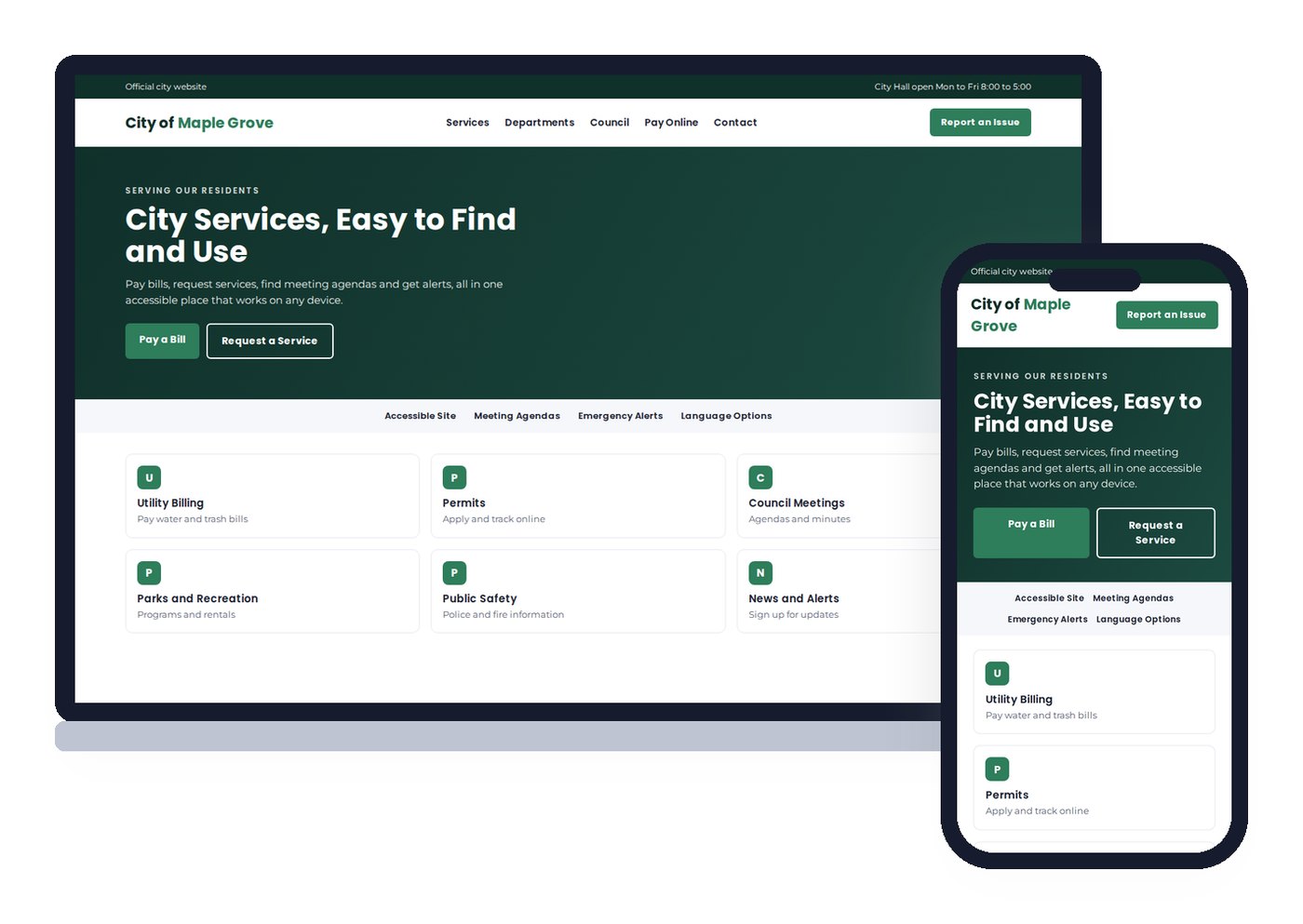
We design government and public office websites around the tasks residents come to complete. Every site is mobile-first, built with accessibility in mind and built on WordPress so staff can post agendas, notices and news without waiting on a vendor.
What Residents Need
What Residents Look For on a Government Website
These are the most common tasks, and we make each one easy to find.
Online payments
Utility bills, fees and fines through your payment provider.
Forms and permits
Applications and requests that work on any device.
Meetings and records
Agendas, minutes and public notices that are easy to search.
Alerts and news
Emergency notices, closures and updates on the homepage.
Departments and contacts
Who does what, with phone numbers and hours.
Accessibility for everyone
Readable text, captions, keyboard navigation and accessible documents.
Government Website Best Practices
Design Elements of an Effective Government Website
The government websites residents rate best share these design elements.
Search that works
A site search that finds services, documents and departments.
Task-based navigation
Menus built around what residents do, like Pay, Apply and Report.
An emergency banner
A way to post urgent notices across the site in minutes.
Language options
Translation and plain language for every resident.
Mobile-first design
Most residents visit on phones.
Accessible documents
Agendas and forms as accessible web pages or remediated PDFs.
We also help public offices avoid the most common problems: outdated pages that no one owns, dozens of PDFs that screen readers cannot read, and navigation organized by department names residents do not know. A clear structure and simple editing tools keep the site accurate long after launch.
Pages That Serve Residents
Pages We Build for Government Websites
Structure is what lets residents find the right service quickly.
Service pages
A page for each resident service with steps, fees and contacts.
Department pages
Each department’s services, staff and hours.
Elected officials
Officials, districts, contact information and news.
Meetings and calendar
Agendas, minutes and public hearing notices.
News and notices
Announcements, press releases and alerts.
Records and transparency
Budgets, reports and public records requests.
For elected officials and candidates, we also build campaign sites through our political consulting team, kept separate from official government sites.
Who We Design For
Websites for Public Entities and Officials
We design around how your residents and constituents use your site.
Cities and towns
Services, departments, council and alerts.
Counties
Precincts, courts, departments and records.
Special districts
Utility, MUD, drainage and emergency service districts.
Elected officials
Official office sites with news and constituent services.
Public education entities
District information and accessibility.
Public agencies
Programs, applications and public information.
Built to Be Found
Making Government Information Easy to Find
Residents often search for a service before they ever visit your homepage, like how to pay a water bill or when trash pickup is. Service pages written in plain language help those searches land on the right page.
We build clear titles and headings, government organization schema and consistent contact details that support local search.
Residents increasingly ask AI assistants about local services. Accurate, structured pages help AI search engines give correct answers about your services.
Features That Serve
Built-In Tools for Government Websites
Your website should reduce phone calls and counter visits.
Payment integrations
Connect the payment provider you already use.
Online forms
Requests, applications and reports routed to staff.
Alerts and notifications
Emergency banners and email sign-ups.
Meeting calendars
Agendas and minutes published on a schedule.
Translation
Language options for your community.
Secure hosting
SSL, updates, backups and monitoring.
Our sites run on WordPress hosting built for Core Web Vitals, managed by the same team that builds them.
Accessibility Requirements
ADA Title II Web Accessibility for State and Local Governments
WCAG 2.1 Level AA
The technical standard the Department of Justice adopted for state and local government web content and mobile apps.
Current compliance dates
April 26, 2027 for entities serving 50,000 or more people, and April 26, 2028 for smaller entities and special districts.
Documents count too
Web pages, forms, PDFs and other documents residents need are part of the picture.
In April 2024 the Department of Justice published a final rule under Title II of the Americans with Disabilities Act requiring state and local governments to make their web content and mobile apps conform to WCAG 2.1 Level AA. In 2026 the department issued an interim final rule extending the original compliance dates by one year, so larger entities must now comply by April 26, 2027 and smaller entities and special district governments by April 26, 2028.
We design and build government websites to that standard from the start and can audit and remediate an existing site. This is general information, not legal advice. Deadlines can change, so confirm your obligations and dates with your attorney.
Trust and Security
Building Citizen Trust in Government Websites
Security
SSL, updates, monitoring and backups protect residents and public data.
Official and credible
Clear branding, contact details and up-to-date information show citizens the site is official.
Better user experiences
Plain language and task-based design help every visitor complete what they came to do.
Municipalities and government agencies across the U.S. are moving more services online, and citizens expect those services to work as well as the apps they use every day. Trust is built by getting the basics right: accurate information, fast pages, accessible design and a secure site.
We work with public sector professionals from planning through implementation. We choose a CMS and platform your staff can maintain, design templates that keep departments consistent, and build in the functionality residents use most, so the site keeps serving the community long after launch.
Planning Your Project
Budget, Timeline and Strategy for Your Government Website
Every government website project starts with strategy: who you need to reach, what you want them to do and what your competitors already offer. That strategy shapes the page structure, the calls to action and the content we write. For most public entities the priorities are accessibility and the most-used resident services.
Cost depends on the number of departments and services, accessibility remediation of existing documents and integrations with payment, permitting and meeting systems. Timelines usually follow procurement steps, content review by departments and accessibility testing.
After launch, department editors keep their own pages current, and we can provide ongoing accessibility checks so new documents and pages keep meeting the standard.
How We Work
How We Build Government Websites
1. Discovery
2. Structure
3. Design
4. Build
5. Launch and grow
FAQ
Government Website Design Questions
Resident services with clear steps, online payments and forms, meeting agendas and minutes, department contacts, news and emergency alerts, and accessible documents.
Yes. Under the Department of Justice’s Title II rule, state and local government web content and mobile apps must conform to WCAG 2.1 Level AA. Current compliance dates are April 26, 2027 for entities serving 50,000 or more people and April 26, 2028 for smaller entities and special districts. Confirm with your attorney.
Yes. We build on WordPress with Elementor Pro and set up roles so each department can update its own pages.
In many cases we can link or embed the systems you use. We confirm what they support during planning.
It depends on the number of departments and services, integrations and accessibility remediation needs. We scope the project first and give you one number in writing.
Yes. We build official office sites and, separately, campaign websites through our political consulting team.
Let's Build a Website That Serves Every Resident
Tell us about your community and the services residents use most. We will show you what your current site is doing and what it will take.
Galleria 713-703-3030 | Kingwood 281-852-8253 | info@verticalweb.com
Keep Exploring
Related Pages
No related posts.